
This is the print version of this page. All content is copyright Indezine.com 2000-2026.
Read the Indezine review of Shape Collage.
Author: Geetesh Bajaj
Product/Version: PowerPoint
Introduction
About Shape Collage
Download and Installation
Working with Shape Collage
Pricing and Support
Conclusion
If you love to create collages of all sorts from your pictures, then you know that positioning and moving individual pictures for a collage can be a time-consuming process that requires many hours of experimentation. Naturally, all those extra hours mean that there is a limit to your creativity since you would not want to start all over again with a collage product. Shape Collage, our review product frees you from these time concerns and lets you focus entirely on your creativity. Well, that's not entirely true since it also bundles oodles of creativity. Even better, the program is freeware and can create layered Photoshop files for your collage! When we saw this for the first time, it did look too good to sound true.
BackShape Collage is from Vincent Cheung, a Computer Engineering PhD student at the University of Toronto. His other initiatives are FaceDown, a product that lets you quickly download Facebook pictures, and JavaScript Encryption and Decryption, an online form-based script. You can learn more about these products and download the free copy of Shape Collage from Vincent Cheung's site.
Shape Collage is a free automatic photo collage maker that allows you to create collages in different shapes. Shape Collage creates collages using an intelligent machine learning algorithm that automatically places the photos in the collage so that they form the desired shape, be it a rectangle, heart, circle, snowman, text, or logo. Created collages can be saved as JPEGs, PNGs, and Adobe Photoshop PSD files. The PSD files are entirely layered and can be edited afterwards using Photoshop's native tools. Shape Collage is available for Windows, Mac OS X, and Linux. For this review, we worked with the Windows version.
Our contact for this review was Vincent Cheung. Thank you, Vincent.
BackDownload the installer, run the setup routine, and follow the instructions. You'll end up with a Shape Collage program group in your Windows Start menu, as shown in Figure 1, below.

Figure 1: Shape Collage Start menu Group
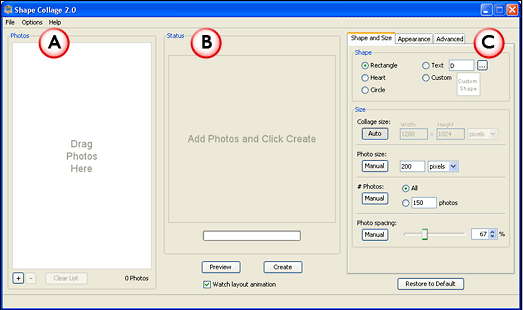
Here are the few quick steps to get started with creating Shape Collage:
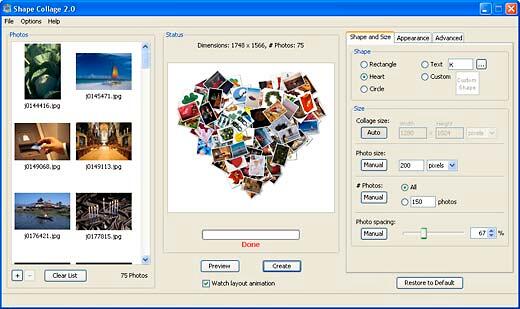
Here are some sample collages created in Shape Collage.



Shape Collage is freeware.
Support option includes e-mail support and an online FAQ.
BackShape Collage is among the most awesome products we have worked with, it is a one-trick pony, and it performs flawlessly.
BackYou May Also Like: How To Present A Fireside Chat In 4 Easy Lessons | Blueberries PowerPoint Templates




Microsoft and the Office logo are trademarks or registered trademarks of Microsoft Corporation in the United States and/or other countries.
