Indezine Logo


Raptivity

Read the Indezine review of Raptivity.


Author:

Product/Version: PowerPoint


Introduction
About Raptivity
Download and Installation
Working with Raptivity
Pricing and Support
Conclusion


Introduction

One of the inherent advantages of eLearning is interactivity. However, creating interactive content requires oodles of creativity. It can also be plain challenging and difficult. And choosing an application to give shape to that creativity is another difficult choice to make.

Raptivity, one of the well-known eLearning creating applications provides a plethora of options and possibilities. In this review, we'll explore Raptivity's interface and capabilities.

Back

About Raptivity

Raptivity is from Harbinger, a company based out of USA and India. Harbinger develops e-learning products for procedural training, management training, soft skills training, banking, etc. You can learn more about their products and download the 14-days free evaluation copy of Raptivity from their site.

Raptivity makes it easy to create eLearning content with a library of pre-built interactions that can be further customized. Raptivity outputs to Flash SWF movies, something that's become a standard in the e-learning sphere these days.

More importantly, Raptivity can create all this content without the need to do any coding or programming.

Raptivity is available in two versions:

  • Raptivity Essential includes the core Raptivity product with 35 interaction models.
  • Raptivity Standard includes the Raptivity Essential product (see above) with Standard Pack 1, Standard Pack 2, and Standard Pack 3 with even more pre-built interactions.
  • In addition, the Booster Pack 1 contains another 35 interaction models.

So, what is an interaction model? These are pre-built templates for types of interaction such as puzzles, slide shows, surveys, learning games, simulations, etc.

All the above products can be purchased as individual products. For more information look at the buy page for the products here.

Our contact at Raptivity for this review was Isha Gupta. Thank you, Isha.

Back

Download and Installation

Download the installer, run the setup routine, and follow the instructions. You'll end up with a Raptivity program group in your Windows Start menu, as shown in Figure 1, below.

Raptivity Start menu Group
Figure 1: Raptivity Start menu Group

Back

Working with Raptivity

Explaining all that Raptivity can do may take an entire book. To keep this review simple, we'll explain a simple task in Raptivity:
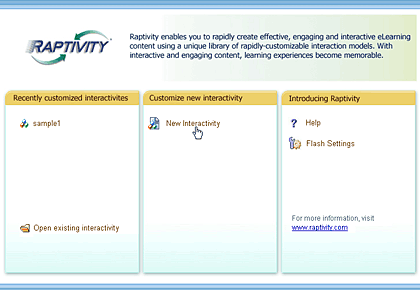
  1. When Raptivity is launched, you are presented with a dialog box, as shown in Figure 2, below, that allows you to choose from New Interactivity and Recently Customized Interactivity.
  2. Working with projects
    Figure 2: Working with projects
  3. Select New Interactivity. Doing so opens the Raptivity Media Explorer dialog box, as shown in Figure 3, below, with a collection of prebuilt interaction models. We chose the Flashing Images with Transitions option.
  4. Interactivities
    Figure 3: Interactivities
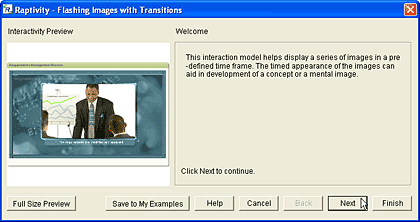
  5. Based on the interaction model selected, a wizard will open, as shown in Figure 4, below. Click the Next button to move to the subsequent screen that allows you to include information about the project, such as title, number of images, transition types, playing time, etc.
  6. Making changes and edits
    Figure 4: Making changes and edits
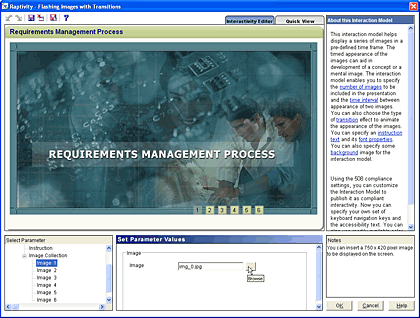
  7. When done with the screens in the wizard, click the Finish button. Doing so opens another window, as shown in Figure 5, below, where you can make some more changes in parameter values.
  8. Properties
    Figure 5: Properties
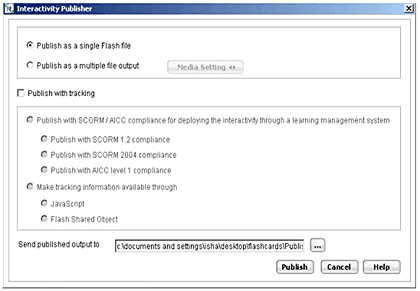
  9. After making the edits, save the project and click the File | Publish option. This action opens the Interactivity Publisher dialog box, as shown in Figure 6, below. This dialog box also allows SCORM/AICC tracking for all interactions.
  10. Publish
    Figure 6: Publish
  11. Click the Publish option, and Raptivity exports your project to a Flash SWF movie. Soon thereafter, it allows you to preview the Flash output.

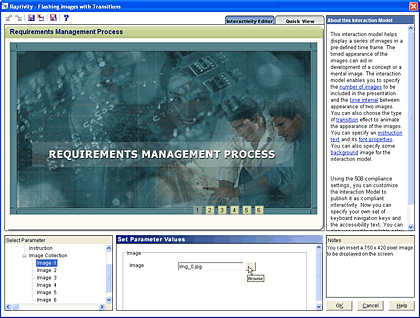
We need to add here that the above workflow explained a very simplified sequence. All through the process, you can customize the interaction model and the output to a very minute level. Apart from the wizard-based interface, Raptivity includes a full-featured Interactivity Editor, as shown in Figure 7, below.
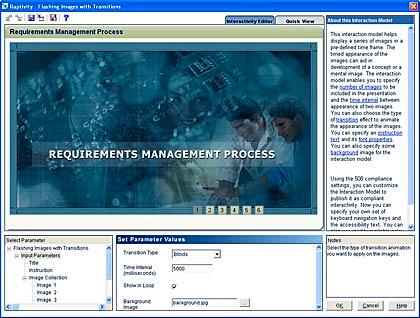
Interactivity Editor
Figure 7: Interactivity Editor

The Flash movies created with Raptivity can be hosted online or inserted within PowerPoint slides. You can also use them with your LMS or integrate them within other Flash authoring environments.

Back

Pricing and Support

Raptivity Essential costs $750 while Raptivity Standard (includes Essential version, Standard Pack 1, 2, and 3) is priced at $1995. The Raptivity Booster Pack 1 costs $495.

Support option includes e-mail, online training, and phone support.

Back

Conclusion

For what it does, Raptivity provides a very viable platform for the creation of learning interactions for e-learning. The interaction model approach keeps the learning curve low. Beginners can use the wizard interfaces while more advanced users will love the customization options available.

Back

You May Also Like: Explore Fonts: Agency FB | Traffic PowerPoint Templates


Popular Posts

Shapes
Shapes
Learn how you can create and manipulate shapes in PowerPoint -- knowledge of working with shapes is significant because they are the building blocks of creativity in PowerPoint.

Insert Picture from the Office ClipArt Collection in PowerPoint 2013
Learn how to insert picture using Office ClipArt in PowerPoint 2013.

Snow Effect in PowerPoint
Create a snow fall effect inside PowerPoint using animation techniques.

PowerPoint Transitions: Curtains
Explore the Curtains transition effect in PowerPoint.


Ebook PowerPoint Keyboard Shortcuts

PowerPoint Keyboard Shortcuts and Sequences Ebook

PowerPoint 365, 2019, 2016, 2013, 2011, 2010, 2007 and 2003 for Windows

PowerPoint 365, 2019, 2016 and 2011 for Mac

PowerPoint for the Web on Windows and Mac

Have you ever used keyboard shortcuts and sequences in PowerPoint? Or are you a complete keyboard aficionado? Do you want to learn about some new shortcuts? Or do you want to know if your favorite keyboard shortcuts are documented?

Go and get a copy of our PowerPoint Keyboard Shortcuts and Sequences ebook.


Microsoft and the Office logo are trademarks or registered trademarks of Microsoft Corporation in the United States and/or other countries.

Home | PowerPoint | Photoshop | PowerPoint Templates | PowerPoint Tutorials | Blog | Notes | Ezine | Media Kit | Feedback | Site Map | About Us | Contact Us

Link to Us | Privacy | Testimonials

PowerPoint Backgrounds | Christian PowerPoint Backgrounds | Business PowerPoint Presentation Templates

Plagiarism will be detected by Copyscape

©2000-2026, . All rights reserved.