
This is the print version of this page. All content is copyright Indezine.com 2000-2026.
Read the Indezine review of muvee autoProducer 6.
Author: Geetesh Bajaj
Product/Version: PowerPoint
Introduction
About muvee autoProducer 6
Download and Installation
Working with muvee autoProducer 6
Pricing and Support
Conclusion
We admit we had a tough time creating our first movie on the computer. It wasn't too difficult to do the DV capture, but getting to grips with new terminology and coping with unfamiliar interfaces in video editing programs wasn't too intuitive. It's precisely for this reason that many people just use a camcorder and don't venture to the next logical step of editing their videos, and the video editing applications bundled with most camcorders or video cards are not very friendly either.
Things have changed in the last few years. Both Movie Maker on Windows XP/Vista and iMovie on Mac OS X are easy-to-use applications. But again, they are very basic and you'll still end up working inside them for hours before creating your own VCD or DVD.
If you can identify with this situation, you should check out muvee.
Backmuvee autoProducer 6 is from Muvee Technologies, a Singapore-based company that's made a business of creating easy movie tools. You can learn more about their products and download the free trial copy of muvee autoProducer from their site.
So, what is muvee? muvee, pronounced "mew-wee" is a wizard-style video application that's amazingly easy to use and the results are nothing short of outstanding. The software does everything for you from capturing your video input to creating a DVD. If it did just that, it would be just another movie editor. So muvee goes further, and it does the entire editing for you from choosing the exact scenes, adding pictures, doing the video mixing with some background music based on a variety of preset styles. You can literally feed muvee with movie clips, and burn a DVD!
To make matters a little confusing, the movies that muvee outputs are also called muvees! muvee also works with still pictures. So, you can use a combination of still pictures and movie clips, or even use only still pictures to make an interesting slideshow style muvee.
Muvee autoProducer 6 includes powerful new personalization features that let you control style and muvee-making settings, and specific program features like magicMoments and magicSpot. In addition, you can tweak muvees, add captions and voiceovers, etc.
My contact at muvee for this review was Tania Chew. Thank you, Tania.
BackDownload the installer, run the setup routine, and follow the instructions. You'll end up with a muvee autoProducer 6 program group in your Windows Start menu, as shown in Figure 1, below.

Figure 1: muvee autoProducer 6 Start menu Group
Here are a few quick steps for creating professional-looking muvees that can be shared easily.
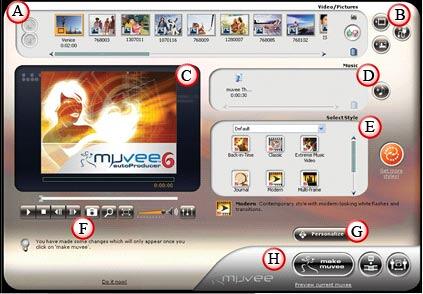
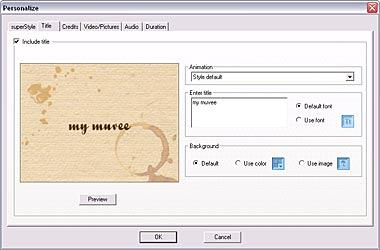
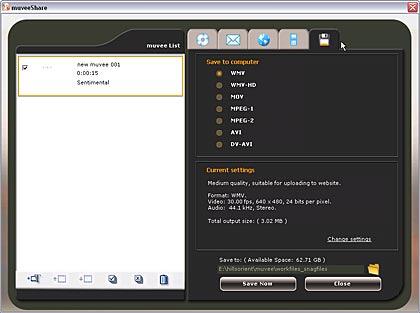
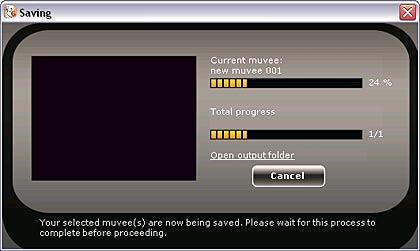
muvee autoProducer 6 costs US$129.95.
Support option includes e-mail support and an online FAQ.
BackFor what it does, muvee autoProducer does it exceedingly well. It allows you to make your video captures more entertaining and interesting. It also provides you with a logical assortment of editing, tweaking, and sharing options. Nothing could be easier.
BackYou May Also Like: Make Your Meetings Productive: Ask These 5 Questions | Divide PowerPoint Templates


Microsoft and the Office logo are trademarks or registered trademarks of Microsoft Corporation in the United States and/or other countries.
