|
|
|
| |
| January 28, 2020 |
| PowerPoint and Presenting News |
|
|
| Presentation Management 11: How Presentation Management Transforms Content |
| |

|
| |
| In the last part of this Presentation Management series of posts, we looked at how presentation management balances both sides of the enterprise: the high-level corporate brand and objectives with the everyday tasks of the employees out in the field. In this post, we will take the concept further, and explore how content gets transformed as a result of presentation management. |
| |
| Read more in this post by AlexAnndra Ontra and James Ontra |
|
| Complex Data-driven PowerPoint Dashboard |
| |

|
| |
| We recently created this data-driven dashboard in PowerPoint by connecting our presentation to a database with our DataPoint add-in. The result is quite astonishing. The database is basically a dummy, where we have a small utility to execute random updates on the data. If you are working for a big company or a big factory, then you probably already have data that is updated extensively. So, here we are simulating updates on the data. |
| |
| Learn more with Kurt Dupont |
|
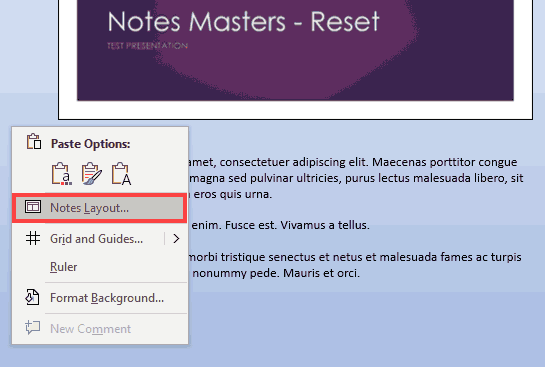
| PowerPoint VBA Code: Reapply the Notes Master |
| |
|
| |
| The Notes Master does not work as predictably as the Slide Master in PowerPoint, and you have to reset (sorry, reapply) the Notes Master to individual Notes pages to see some changes you made. Why is that so? That’s mainly because there’s no way to select all Notes Pages in your presentation at the same time. Would VBA provide an easier and more elegant solution? Steve Rindsberg of PowerPoint FAQ and PPTools believes you can get this task done is so much less time. |
| |
| Read more here |
|
| What You Need to Know About Leadership Before Becoming a Leader |
| |

|
| |
| People often ask me if I enjoy being a senior leader in my organization and my answer is invariably ‘Yes I do.’ Leadership is an amazing experience but it can be hard, and people often harbor unrealistic expectations about what is involved. |
| |
| Learn more from Florian Bay of Toastmasters |
|
| Quotes
|
| |
When I Started Storytelling: by Margot Leitman
"I can honestly say that when I started storytelling—speaking openly about my experiences—my life changed for the better. I started having sincere relationships with people right away, instead of hiding behind bravado or small talk." |
|
|
|
| Reading View in PowerPoint 365 for Mac |
| |

|
| |
| Reading View is one of those important features that are not available yet on PowerPoint 365 for Mac. If you want to ask Microsoft to add this feature to PowerPoint 365 for Mac, you can visit the PowerPoint UserVoice site, and vote for this suggestion. Someone has already put up this suggestion, so do vote for this feature. Suggestions with more votes are implemented sooner than others. |
| |
| Read more here |
|
| Slide Master View in PowerPoint 365 for Windows |
| |

|
| |
| Slide Master View is an important view within PowerPoint 365 for Windows. Why? Because, if you make any changes or edits within this view, these modifications will influence all slides within your presentation. For example, if you want to make your company logo appear on all the slides, you will have to add the logo within the Slide Master. If you want the font size of your slide titles to be a little larger or smaller, then those edits also need to be made in the Slide Master. |
| |
| Read more here |
|
| Slide Master View in PowerPoint 365 for Mac |
| |

|
| |
| Slide Master View is an important view within PowerPoint 365 for Mac. Why? Because, if you make any changes or edits within this view, these modifications will influence all slides within your presentation. For example, if you want to make your company logo appear on all the slides, you will have to add the logo within the Slide Master. If you want the font size of your slide titles to be a little larger or smaller, then those edits also need to be made in the Slide Master. |
| |
| Read more here |
|
| Handout Master View in PowerPoint 2019 for Windows |
| |

|
| |
| Handouts are documents you can print from within PowerPoint that include slide representations from your presentation. PowerPoint lets you include as many as 9 slides on each Handout page. Of course, with 9 slides on a page, your slides will look more like thumbnails. You can also choose to print just one slide on every handout page, so then your Handout pages will look like individual slides printed on a page. |
| |
| Read more here |
|
| PowerPoint Templates from Indezine |
|
|
|
|
| PowerPoint Templates from MedicinePPT |
|
|
|
|
| PowerPoint Templates from LegalPPT |
|
|
|
|
| PowerPoint Templates from FreePPTTemplates |
|
|
|
|
| PowerPoint Templates from ChristianPPT |
|
|
|
|
| End Note |
| |
| © Indezine. Please do not reply to this message. |
| |
| Join this list |
| |
| Received this email from a friend? If you would like to receive your own copy, join our mailing list. Go here. |
|
|
| Previous issues |
| |
| Do you want to read older issues of this newsletter? Go here. |
|
|
|
| Privacy Policy |
| |
| We never share your info with anyone. Read our Privacy Policy. |
|
|
| Mail Provider |
| |
| This mailing list is powered by Aweber. |
|
|
|
| Change Subscription |
| |
| If for any reason, you no longer want to receive this newsletter with valuable tips, resources, and information about PowerPoint and presenting stuff, you can unsubscribe by clicking the link at the end of this email. No hard feelings! |
|
|
|
|
|
|