|
|||
PowerPoint and Presenting News |
|||
|
by Geetesh Bajaj, January 03, 2017
View as a web page |
|||
|
|||
Learn PowerPoint 2016 for Windows
Reset Slide  Sometimes we come across slides that can be hazardous to our vision because such slides have nothing understated about them. Such loud slides can ensure that audiences get distracted. You might end up with such slides even with no fault of yours because someone else prepared them for you! You now need to eradicate all the formatting on the slide to make it look more simple and clean. You may need to change the position, size, and text layout for the placeholders on the slide too. Fortunately, there is an easy, one-click process to restore some sanity in such slides. It's called the Reset option. Comparing and Merging Presentations  If you are working on a presentation with your clients or even a co-worker, then you might end up in a situation where you both did not work on the same copy, one after the other. Instead, you worked on two different copies. These copies may contain changes done by you both, some similar and some different. Now you need to compare and merge these copies into a single, cohesive file without losing anything at all! Artistic Effects for Pictures 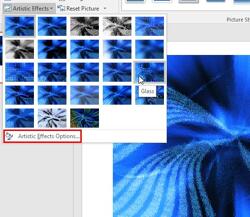 PowerPoint is a slide program but that doesn't mean that it does not have some cool picture editing tricks up its sleeve. When we say "cool", we certainly do not mean just inserting a picture, or even the fact that you can apply corrections or recolor hues. PowerPoint 2016 provides around 23 filters as part of its Artistic Effects options. Some of these filters (effects) can make your pictures look like paintings or sketches, and others can change the texture of your pictures. Compress Pictures  Yes, undoubtedly a presentation with relevant pictures is more effective than plain text slides. However, even if pictures enhance appearances, they can also phenomenally increase the size of your presentation file. Picture compression can help. Recent versions of PowerPoint do some automatic picture compression, even if you are not aware. There are options to make any such compression even more effective. Set Document Resolution  One of PowerPoint's greatest qualities is that you can get all sorts of content from disparate sources and add them all within one presentation to create a unified document. Pictures are one of the most important content types you add on your slides. However, each picture you insert may have different resolutions, and thus even though you may have sized your picture to look like a small postage stamp on your slide, it may be increasing your file size by several megabytes. |
|||
PowerPoint Templates from Indezine
|
|||
|
|||
PowerPoint Templates from MedicinePPT
|
|||
|
|||
PowerPoint Templates from LegalPPT
|
|||
|
|||
PowerPoint Templates from FreePPTTemplates
|
|||
|
|||
PowerPoint Templates from ChristianPPT
|
|||
|
|||
|
|||
© Indezine. Please do not reply to this message
End NoteReceived this email from a friend? If you would like to join our mailing list, go here.Read past issues of this newsletter This newsletter provides more info on better PowerPoint usage and presentation design. You can also opt to get our RSS feed, where you can get updates through Feedburner. See our Privacy Policy. Follow on Twitter | Join our LinkedIn Group | Join our Facebook Group Do let us know how we are doing -- we love to hear from you! And if you enjoyed reading any content on Indezine.com, please do like them on Facebook and other social platforms, click the Google +1 buttons on all these pages, and tweet them all so that you can share these joys with others -- and keep your feedback coming! Have a fabulous week. Our PowerPoint and Presenting Blog is updated daily with information on what's new and happening in the world of PowerPoint. The Indezine News mailing list is powered by Aweber. If for any reason, you no longer want to receive this newsletter with valuable tips, resources, and information about PowerPoint and presenting stuff, you can unsubscribe by clicking the link at the end of this email. No hard feelings! {!global calltoaction} |