
This is the print version of this page. All content is copyright Indezine.com 2000-2026.
In this interview, Jerry talks about his new book, Presentations in Action.
Product/Version: PowerPoint
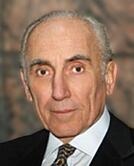 Jerry Weissman is among the world's foremost corporate presentations coaches. His private client list reads like a who's who of the world's best companies, including the top brass at Yahoo!, Intel, Intuit, Cisco Systems, Microsoft, Netflix and many others.
Jerry founded Power Presentations, Ltd. in 1988. One of his earliest efforts was the Cisco Systems IPO road show. Following its successful launch, Don Valentine, of Sequoia Capital, and then chairman of Cisco's Board of Directors, attributed "at least two to three dollars" of the offering price to Jerry's coaching. That endorsement led to more than 500 other IPO road show presentations that have raised hundreds of billions of dollars in the stock market. In this conversation, Jerry discusses his new book: Presentations in Action: 80 Memorable Presentation Lessons from the Masters.
Geetesh: Presentations in Action, your new book is not too heavy and can be carried anywhere, and all the content is in the form of small articles of one or two pages. Is this an activity book?.
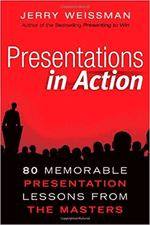 Jerry: The activity is mental: stretching the scope of the mind. Each article, drawn from fields seemingly apart from presentations, provides a short lesson directly related to presentations. The brevity is intended to stimulate thinking about the universal aspects in all forms of communication. While there are fuller presentation-specific activities in my other books, Presenting to Win, The Power Presenter and In the Line of Fire upon which Presentations in Action is based, this new book reaches beyond presentations into current events, politics, science, art, music, literature, cinema, media, sports, and even the military. The diversity provides a broader perspective that illustrates and amplifies the fundamentals of all human exchange.
Geetesh: Having read your book, I thoroughly enjoyed the lessons it contains, and successfully implemented many of them – I know this is a difficult question, but are any of the lessons more dear to you than the others?
Jerry: Yes, the first and the last. As a writer, I hope you’ll accept this play on words: these chapters form the bookends.
The first, inspired by a scene from the classic film, The Wizard of Oz, is about the importance of customizing a presentation. Many presenters are road warriors, delivering the same pitch multiple times without changing a word. This chapter provides seven techniques to make a presentation come alive.
The last chapter was inspired by the Mother Goose nursery rhyme, “The House That Jack Built,” which is all about interrelationships. In presentations, all the basic elements of a presentation—story, graphics, delivery, and Q&A—must be connected and integrated into a solid structure.
Geetesh: In your career as a presentation coach, you have influenced many people. Who has influenced you?
Jerry: Two major influences, both academic. The first was my college speech teacher, Harry Muheim, who instilled in me the importance of focusing on the audience. The second was Mortimer J. Adler, the author of How to Speak, How to Listen, and a scholar of the classics who focused on Aristotle who stressed the importance of focusing on the audience.
Geetesh: What in your opinion is the quality most lacking in today's presentations and presenters?
Jerry: Engagement. Most presentations are one-way streets that unload carloads of densely-packed, disorganized, and irrelevant information on helpless audiences without regard to their basic interests or how they react to the presentation in real time. Most presenters abdicate their role in the process, leaving the expression of their information to their PowerPoint slide show. Effective presenters tell their own stories and track how their audiences are reacting. That way, presenters can make mid-course adjustments—which the slides cannot do.
Presenters should think of themselves as air traffic controllers, directing the flight path of every piece of information from take-off to landing.
Geetesh: If there's just one thing that presenters could do to make their presentations more effective, what do you think that should be?
Jerry: Role model yourself as a television news anchor person. The men and women who deliver the news look their audiences straight in the eye (via the camera) and tell their stories directly. The only graphics the anchors use are simple images that serve as headlines; their narrative provides body text. Treat your PowerPoint slides as headlines, look your audiences straight in the eye, and tell them your story.


Microsoft and the Office logo are trademarks or registered trademarks of Microsoft Corporation in the United States and/or other countries.
