
This is the print version of this page. All content is copyright Indezine.com 2000-2026.
Read the Indezine review of PowerPlugs: Headings.
Author: Geetesh Bajaj
Product/Version: PowerPoint
Introduction
Alpha Channels
PNG
Using PowerPlugs Headings
Conclusion
PowerPlugs: Headings is the newest member of the fine family of PowerPoint plug-ins from the house of Crystal Graphics. I doubt if these could be strictly classified as a set of plug-ins since no new capabilities are added to PowerPoint itself. Instead, PowerPlugs Headings which is available in two volumes is an amazing collection of headings for your PowerPoint slides. Each of these volumes comprise of over a thousand headings and corresponding backdrops intended to visually enhance your PowerPoint slide shows.
Throughout the rest of this article you will read the terms 'alpha channel' and 'PNG' very often. Let's look at them briefly.
BackWe all know that bitmaps can be stored in a variety of formats - these include the ubiquitous BMP, and other formats like JPG, GIF, PNG, PSD, TIF, PCX, etc. A certain area of some of these formats can be stored as a selection or transparency. These selections or transparencies can be either stored as blocks or as gradations. All such information regarding the location, design and existence of such blocks or gradations are stored along with the file format in a special channel. These channels are grayscale in nature with black and white denoting transparent and opaque areas - the grays in between convey the amount of transparency. These channels are called 'alpha channels'. Alpha channels have a maximum colour capability of 256 brightness values represented on the grayscale map.
For more information on usage of alpha channels within PowerPoint, read the following article, elsewhere on this site:
BackPNG is one of the bitmap formats which supports alpha channels. Although PNG was developed as a replacement for the GIF format for use in the realm of Internet graphics - most browsers don't support all PNG capabilities such as alpha channels. It is thus surprising that PowerPoint supports many advanced features of the PNG format including alpha channels.
BackNow that we have delved into 'alpha channels' and 'PNG', let's get back to discussing our original subject - PowerPlugs Headings. In it's very basic form, PowerPoint Headings is a huge collection of PNG files with brilliant alpha channels. PowerPoint is one of the few programs that support PNG alpha channels - PowerPlugs Headings takes advantage of these PowerPoint capabilities. This means you are not restricted to using our PowerPlugs Headings in PowerPoint alone - it's just that Crystal Graphics already has a great PowerPoint plug-in line called PowerPlugs and this concept seems to tackle along well with the rest of the range. We all know that PowerPoint is such popular product - and to be fair to Crystal Graphics, both PowerPoint users and Crystal Graphics benefit from such alpha channels being available within PowerPoint: a complete win-win situation.
PowerPlugs Headings are better seen than explained - so I've put together the same set of PowerPlugs Headings against a variety of backdrops. Although PowerPlugs Headings come with text labels, all heading styles are also available without labels - these unlabelled ones are used for the examples here. Let's examine these screen shots:

Here the PowerPlugs Headings have been placed against a regular PowerPoint gradient. As you can see, the Headings take on the shades of the colours under them.

In this instance, the Headings are placed against a tiled background. All Headings are not very visible, so you may have to try out the styles which work in any particular case.

This is a plain colour background. All elements are perfectly visible and the Headings manage to lend a sophisticated look to a plain layout.

We've used a PowerPoint pattern in this example. Patterned backgrounds end up looking great with PowerPlugs Headings.
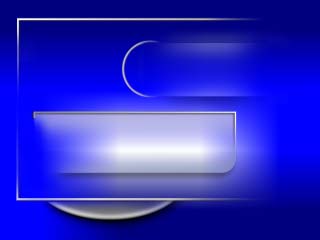
Here, we've used a stretched background - the picture stretched is only 10 x 10 pixels!

Finally, we've used a regular full-screen picture background. Depending on their placement against the elements in the background picture, Headings look anything from elegant to stunning.
You'll have to trust me when I say that all PowerPlugs Headings look much more attractive when viewed as a full screen presentation.
BackAs you see, a slide with PowerPlugs Headings applied is like a three dimensional veil with shadows, highlight and bevels. This works across all PowerPoint versions and platforms. This is not to say that PowerPlugs Headings is without its cons - I wish they had more plain heading styles. In most of the cases, the plain styles have been made available with many variants - these include text headings for the more common presentation headings. Even though Crystal Graphics supplies you with as many as 300 common heading titles rendered for each plain style - they still cannot cover every imaginable title you may require. That's part of the reason why I haven't delved much about the readymade Headings in this review.
You can view more samples and learn more about PowerPlugs Headings here (link no longer exists).
BackYou May Also Like: Gabon Flags and Maps PowerPoint Templates | FILEminimizer Office 5.0


Microsoft and the Office logo are trademarks or registered trademarks of Microsoft Corporation in the United States and/or other countries.
