
This is the print version of this page. All content is copyright Indezine.com 2000-2026.
Read the Indezine review of PowerPlugs PhotoActive FX, Page 1 of 2.
Author: Geetesh Bajaj
Product/Version: PowerPoint
Introduction
Download & Installation
About PhotoActive FX
Adding some pizzazz to your next PowerPoint presentation can be easy with PhotoActive FX from CrystalGraphics. This two volume add-in for PowerPoint allows you to create photo effects right inside PowerPoint. It also includes a video rendering engine that creates customized video clips that integrate seamlessly within your presentation.
CrystalGraphics, based in Santa Clara, California, United States is probably the largest provider of PowerPoint add-ins. Their PowerPlugs series of add-ins include Transitions, Music, SuperShapes, Headings and PhotoActive FX, the subject of this review. In addition, CrystalGraphics also creates a combo collection of PowerPoint add-ins called the Ultimate Combo.
BackYou can download a demo version of PhotoActive FX from the CrystalGraphics website (link does not exist).
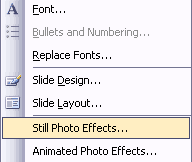
The download weighs over 9 mb. Installation is simple - just click the downloaded file to install the product. The next time you run PowerPoint, you'll find a small PhotoActive FX toolbar within the program. Also, you'll find two new options in your Format menu.

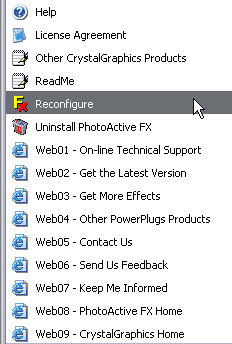
In addition, you'll find a new PhotoActive FX group within your Windows Start menu.
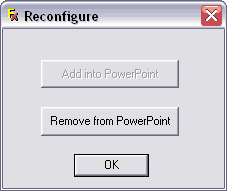
If you have more than one version of PowerPoint installed on your system, you'll find that PhotoActive FX shows up only in the latest version of PowerPoint. To enable it in an older version of PowerPoint, follow these steps:
Now that we have got the installation issues resolved, let's get to actually using PhotoActive FX. PhotoActive FX comes in two volumes and each volume contains both still and animated effects. For this review, I have both volumes installed. CrystalGraphics sells both volumes individually - you can also buy a combined version. In addition, PhotoActive FX is also available as a component of the Ultimate Combo suite of PowerPoint add-ins.
The current version of PhotoActive FX is 1.33 and it works with PowerPoint 97, 2000 and 2002. I had no problem using the add-in (version 1.33) with a pre-release copy of PowerPoint 2003 as well.
BackYou May Also Like: Cyprus Flags and Maps PowerPoint Templates | Cinematize

Microsoft and the Office logo are trademarks or registered trademarks of Microsoft Corporation in the United States and/or other countries.
