
This is the print version of this page. All content is copyright Indezine.com 2000-2026.
Read the Indezine review of Equation Editor.
Author: Geetesh Bajaj
Product/Version: PowerPoint
What is Equation Editor?
Who Uses Equation Editor With PowerPoint?
Equation Editor Links
Corresponding Versions
Add Equation Editor To The PowerPoint Toolbar
Animating Equations in PowerPoint
MathType - The Big Brother
Equation Editor is a small application that often acts as an embedded OLE object to insert quotations in mainstream Microsoft Office applications like Word, Excel, PowerPoint, Publisher and Works. Although it is often called Microsoft Equation Editor, the actual product is a subset of a more capable equation editing application called MathType - both Equation Editor and MathType are created by Design Science, a company based in Long Beach, California, United States.
For many basic and intermediate uses, Equation Editor is all you need - it's more than capable if all you need to do is show or print equations in your presentations or documents.
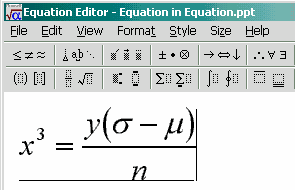
For as long as I can remember - or perhaps even before that, Equation Editor has been an important component of Microsoft Office. While Equation Editor works great in tandem with Word, Excel or Publisher - for reasons of clarity and relevance, we'll discuss using it with PowerPoint. More often than not, you can use it in the same way with other Microsoft Office (or any other) application. Incidentally, many more products including newer versions of Corel WordPerfect Office ship with almost the same version of Equation Editor - so ideas on this page should help that user base as well.
BackIf you asked that question, you are not alone. More often than not, this state of affairs is because there are many of us who are not aware of the existence of this application - ironically because it is bundled free with the world's best selling office suite. Just to make sure, I checked up three well known PowerPoint books in my collection - not one listed it within its index. This is partly because Equation Editor is a specialized application that seems suited for a semi-vertical audience. However, that's not entirely true, since Equation Editor itself can do a lot more than input Greek symbols in mathematical and statistical formulae. Although Equation Editor is very well suited for use by architects, mathematicians chemists and scientists, it can also be put to use by food technicians, decorators, recipe authors, hobbyists and students as also almost anyone else.
BackHere's a list of links I've compiled for those of you who would like to get started or improve their Equation Editor skills:
Here is a list of corresponding versions of Equation Editor that shipped with Microsoft Office. Thanks to Bob Mathews of Design Science for providing this information:
Word 2.0 - Equation Editor 1.0
Office 4.3 - Equation Editor 2.0
Office 95 - Equation Editor 2.0
Office 97 - Equation Editor 3.0
Office 2000 - Equation Editor 3.01
Office XP (2002) - Equation Editor 3.1
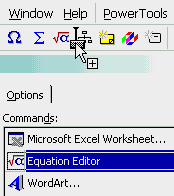
This is excerpted from PowerPoint 2000 help - for some reason it does not appear in PowerPoint 2002 help.
It is easy to animate equations in PowerPoint - although your equations will no longer remain editable (although we'll incorporate ways to get around that as well).
Although Equation Editor may be all you need, you may not know what you are missing. Design Science, the creators of Equation Editor also make a similar product with many more features - you might have guessed its name - it is called MathType.
You can find a comparative listing of Equation Editor and MathType at their site:
MathType for Windows vs. Equation Editor
Once you've seen that, you might want to look at a detailed listing of MathType features:
Design Science has a set of similar pages for their Macintosh versions.
The current version of MathType is version 5 - as expected, you'll find more info and tutorials on the product at the Design Science web site.
You'll also find more information on MathType on this site - detailing its use with PowerPoint.
BackYou May Also Like: Sheep PowerPoint Templates | Flevy Tools: The Indezine Review


Microsoft and the Office logo are trademarks or registered trademarks of Microsoft Corporation in the United States and/or other countries.
