
This is the print version of this page. All content is copyright Indezine.com 2000-2026.
Learn how you can identify font file types.
Author: Geetesh Bajaj
Product/Version: PowerPoint
Have you heard that all fonts are not the same? Did you know that only TrueType fonts can be embedded in PowerPoint, and that too only on Windows versions of PowerPoint? And what are the other font file types? On this page, we will explore these topics.
For purposes of clarity, we will identify these font types:
We typed some text and brought up the Fonts Gallery within PowerPoint, as you can see in Figure 1, below.
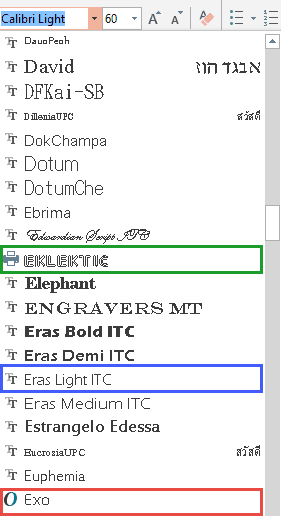
Figure 1: PowerPoint’s Font Gallery
You will notice that all font names in the Gallery are preceded with an icon. You will find three distinct icon types:
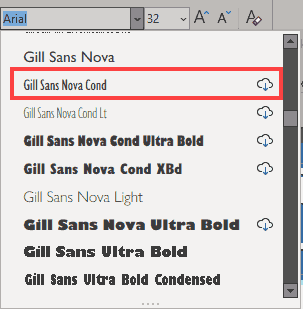
While most PowerPoint versions on Windows do provide visual indicators in the Fonts Gallery, the same is not always true for Mac versions of PowerPoint.
You May Also Like: The Importance of Behavioral Flexibility in Leadership | Russia Flags and Maps PowerPoint Templates



Microsoft and the Office logo are trademarks or registered trademarks of Microsoft Corporation in the United States and/or other countries.
