
This is the print version of this page. All content is copyright Indezine.com 2000-2026.
Learn how to create word clouds for PowerPoint.
Author: Geetesh Bajaj
Product/Version: PowerPoint
Have you seen a bunch of words with similar meanings that are arranged together to form a graphic? Look at
Figure 1, below to see one such sample. Such a graphic is commonly called a Word Cloud.

Figure 1: A sample Word Cloud graphic
These Word Clouds are primarily textual art and define subjects, scopes or even ideas. Such clouds may contain words that involve or influence the subject which the presenter or the user is focused on.
Creating a Word Cloud by inserting text boxes and rotating them is possible using just PowerPoint’s native features. However, it is time consuming and the visual output may not appeal all the time. So what do you do to create a Word Cloud without having to spend time to design it? Fortunately, we've found an online application called Wordle that allows you to create Word Clouds in minutes.
Once you are done installing or updating Java, go to the
Wordle web site, and you will see the home screen as
shown in Figure 2, below.

Figure 2: The Wordle site
Now click on the Create link, as shown highlighted in red within
Figure 2.
The link will navigate to a new page, as shown in Figure 3, below.

Figure 3: Create a new Wordle
Here you have several options. You can either type or paste the words you want to use. Separate each word with space.
When you are done with adding the words, click the Go button (highlighted in
red within Figure 3). In a couple of minutes, a new screen containing your
Word Cloud will appear, as shown in Figure 4.

Figure 4: New Word Cloud graphic created
Remember you are not just limited to the default output you are provided. Several extra options are provided to you above and below the output to optimize your world cloud in the way that pleases you.
Since we want to export this Word Cloud to PowerPoint, you can click on the Open in Window button,
highlighted in red within Figure 4, above. This will open the applet in a
new window as shown in Figure 5, below.

Figure 5: Word Cloud in a new window
The options present in the applet are detailed below.
Let's start with the top section. This section has 5 menus as detailed below:
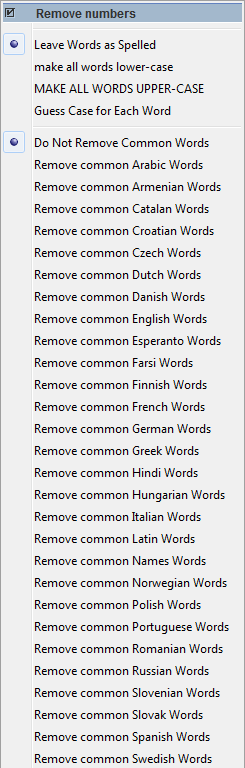


The bottom section contains 3 buttons as detailed below:
Using Wordle, you can create your own word clouds and use them as you like. According to the site there are no restrictions for usage. You can export, print on paper, clothes etc. or even import them into programs such as PowerPoint etc.
Microsoft and the Office logo are trademarks or registered trademarks of Microsoft Corporation in the United States and/or other countries.
