
This is the print version of this page. All content is copyright Indezine.com 2000-2026.
Read the Indezine review of Neuxpower NXPowerLite 2.
Author: Geetesh Bajaj
Product/Version: PowerPoint
NXPowerLite Again
What's New?
Evolving NXPowerLite 2
Putting the Squeeze
Pricing, Upgrades and Support
In Conclusion
We last reviewed NXPowerLite 1 almost two years ago, and the product continues being the easiest-to-use PowerPoint compression product. We were aware that the team at Neuxpower was creating this new version which was the result of many feature requests. The new version has now been released and it's time to do a review again.
Rather than do a similar review again, we'll focus on the changes and the reasons that evolved those changes. We'll also explore if those changes still make NXPowerLite 2 a compelling product to own. For those of you who want to read the earlier review, it's still available on this site.
We wish to thank Tommy Powell of Neuxpower for coordinating this review.
You'll find more info about the product at the NXPowerLite site.
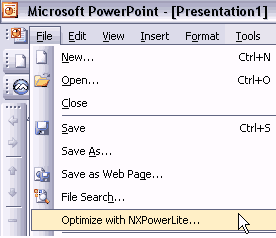
BackWhile NXPowerLite 1 only functioned as a standalone product that had to be used outside PowerPoint, NXPowerLite 2 functions as an add-in right inside PowerPoint so that you can compress your presentations within the program (see screenshot). The other non-integrated option is still available though, and we like the idea of choosing between these two options.
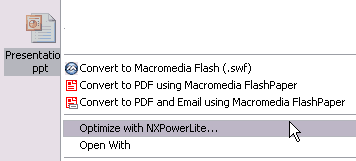
Neuxpower calls this new option the NXPowerLite Integrated Version, and this integration goes beyond the PowerPoint menus. It also adds Explorer integration so you can right-click any PowerPoint file within Windows Explorer, and find the Optimize with NXPowerLite option right there (see screenshot).
Also, NXPowerLite now supports PowerPoint presentations created using StarOffice and OpenOffice.
BackWe asked Tommy if there were any improvements in the compression engine of the new version. He and Andrew Molyneux of Neuxpower had tons of information to share:
The compression engine for NXPowerLite 2 has been completely rewritten. It now operates directly on the user's PowerPoint files.
Previous versions of NXPowerLite worked by automating PowerPoint, which was slow and caused a number of problems. For example, there was no way that we could automate PowerPoint to compress images that contained transparency, so these images were ignored. By working directly with the PowerPoint file format, we can now optimize these images perfectly. Another issue was related to PowerPoint's infamous 'allow fast saves' feature. We all know how much allowing fast saves bloats the size of PowerPoint files. Well, when we were automating a copy of PowerPoint that had fast saves enabled, the final file sizes were less impressive than they could have been without it. Now that we do not have to save the optimized file from within PowerPoint, it doesn't matter whether the user has fast saves enabled or not! The compression engine also now handles PowerPoint 2003's Photo Album feature much more effectively.
Basically, operating directly on the PowerPoint files is much faster and gives us much more control over the optimization process. As a result, optimized presentations are smaller and better quality than ever before.
We also asked them about the evolution of NXPowerLite:
With regard to the evolution of NXPowerLite. To a certain extent, this has been led by user requirements. We have always listened to our users and tried to accommodate their requests through a number of free updates in the past. For example, we have been constantly adding support for more and more image and OLE object types. We've also always tried to find ways to improve the speed of the compression process, as well as the size and quality of the output files. However, earlier this year we reached a point where we could not really achieve what we wanted to without a complete re-write, which our development team worked on throughout much of 2005.
One of the most visible changes to NXPowerLite 2 is that we are now offering both a standard and integrated edition of the product. Again, this decision was based on user feedback. A large percentage of users loved the fact that NXPowerLite 1 was a stand-alone app, that required no installation and did not affect their copy of PowerPoint in any way. However, a growing number of users really wanted to see the product integrated with PowerPoint and Windows Explorer. Not wanting to let anybody down, we decided the best way forward was to offer our customers the choice.
We're confident that re-writing the code from the ground up and working directly with people's PowerPoint files (rather than automating PowerPoint) was the way forward. We now have a strong code base that will allow us to be far more flexible in the future with regard to adding new functionality, as well as new versions of PowerPoint.
Neuxpower is committed to the ongoing development of NXPowerLite 2. In fact, based on feature requests, comments, and ideas from visitors to the recent PowerPoint Live expo in San Diego, we are already planning to release NXPowerLite 2.1 (a free update for 2.0 users) in early 2006. We will also be working hard to ensure that NXPowerLite works perfectly with Microsoft's Office 12, when it is released in the second half of 2006.
Wow, that was awesome info - thank you, Tommy and Andrew.
BackNow let's put the squeeze and see how NXPowerLite 2 performs.
For this test, we took four random, sample presentations that we receive from everyday clients. We knew all our presentations were already optimized so I had to work with other people's presentations!
Here's a table that shows the before and after file sizes of some of these presentations:
| Size in Megabytes | Before | After |
| 01 | 11.1 | 1 |
| 02 | 13.5 | 5.76 |
| 03 | 46.8 | 1.34 |
| 04 | 6.46 | 0.85 |
Those changes are quite dramatic. Since we started working on this review, we've made a habit of processing all the presentations that we need to send back to the clients through NXPowerLite, and some clients actually got back and asked about this magic squeeze!
To be fair, we find that the quality of pictures in some of the slides was somewhat degraded, but you'll need to look at them with that "eye" to discern the difference - and for everyday tasks, the amount of bandwidth and time saved by sending smaller presentations is certainly worth the effort.
BackNXPowerLite 2 is priced at US$45.50 - and upgrades from version 1 cost less. Multiple licenses are also available.
Support is through email - and a detailed online FAQ is available.
BackIf you work with your share of presentations, NXPowerLite is worth its price manifold times. True, you could create optimized presentations yourself with well-saved images, and tweaking PowerPoint's save and compression options. But that's too time-consuming, and not as intuitive as feeding the PowerPoints to NXPowerLite, which will chomp them down to size.
BackYou May Also Like: Flags and Maps - E PowerPoint Templates | Ars Media Photoshop to PowerPoint Plug-in



Microsoft and the Office logo are trademarks or registered trademarks of Microsoft Corporation in the United States and/or other countries.
