
This is the print version of this page. All content is copyright Indezine.com 2000-2026.
Read the Indezine review of ActiveSlide Thunder.
Author: Geetesh Bajaj
Product/Version: PowerPoint
Introduction
About ActiveSlide Thunder
Download and Installation
Using ActiveSlide Thunder
Pricing and Support
Conclusion
Although creating presentations in PowerPoint is so easy, there's one thing that PowerPoint can still not do, and that is creating interactive elements that can be dragged and animated at the same time. Most of the time, any click while a PowerPoint slide is playing results in the next animation or the next slide.
ActiveSlide Thunder, the product being reviewed here gets around that limitation by using Flash SWF movies inserted in PowerPoint to offer interactivity and animation at the same time. And it creates these interactive Flash components in a few minutes using a wizard based metaphor.
BackActiveSlide Thunder is the basic version. The advanced version is called ActiveSlide Professional, that adds more niceties. This review will look at ActiveSlide Thunder (hereafter ActiveSlide).
ActiveSlide is from pharus53 software solutions GmbH, a company based out of Hamburg, Germany. You can learn more and download a trial version of ActiveSlide from their site.
ActiveSlide creates interactive Flash components intended for use in PowerPoint presentations, websites and e-learning courses. The application has inbuilt wizards which helps you to create Flash movies that include draggable elements, navigation, animation etc.
Our contact at ActiveSlide for this review was Tobias Windbrake. Thank you, Tobias.
BackDownload the installer from their site, run the setup routine and follow the instructions. You'll end up with an ActiveSlide Thunder program group in your Windows Start menu, as shown in Figure 1, below.

Figure 1: ActiveSlide Thunder Start menu Group
Unless you buy a full version that includes a license file, you'll run the product in demo mode.
BackActiveSlide does not convert Flash into PowerPoint or vice versa, nor does it insert the Flash movies that you create in ActiveSlide or some other application into PowerPoint. ActiveSlide's main forte is to create Flash SWF components that feel and look good inside your PowerPoint presentations, and that's the reason why ActiveSlide uses the slide metaphor so that PowerPoint users can feel at home within the program.
This tutorial will show you how you can create a quick Flash SWF component in ActiveSlide:
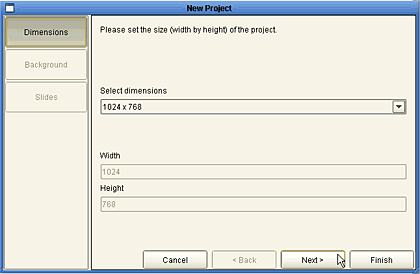
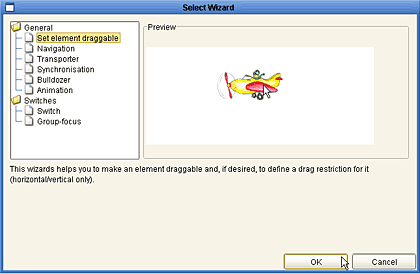
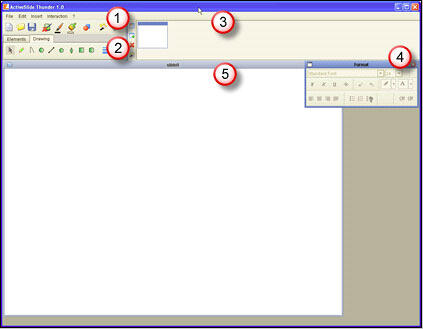
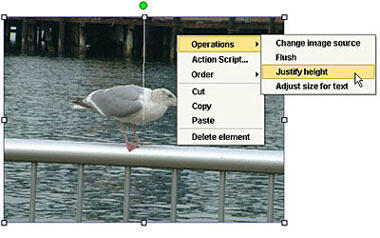

To see the output, you should have the latest versions of the Adobe Flash player installed on your system.
Once your Flash component is created, it's easy to insert it inside PowerPoint.
BackActiveSlide is available in two versions: ActiveSlide Thunder, the basic version reviewed on this page, and the more advanced ActiveSlide Professional version. ActiveSlide Thunder Edition costs EUR 39.90 (or an equivalent USD rate) and the ActiveSlide Professional Edition costs EUR 498 (or an equivalent USD rate).
Support options include email support, online tutorials and a FAQ.
BackWe like ActiveSlide because it makes it so easy for non-Flash designers to create something so quick. And the examples on their website show you that the possibilities are so engaging.
The price is right too, but we found several dialog boxes still use Germantext. We wish they create a full English version of the program. Also, 3 slides is probably a very limiting factor. That small grouse aside, ActiveSlide is certainly a winner.
Update: Tobias got back to me and wanted to add this info:
In the upcoming release (in two weeks of time) everything is translated. So, you'll find no German dialog boxes.
All examples shown on our website have been created with ActiveSlide Thunder, most of them actually using one slide. The focus of ActiveSlide Thunder is creating interactive components, so in most of the cases you don't need more. In some cases (e.g. software simulations) it is indeed helpful to have more slides, and that is where you could upgrade to the Pro Edition. There you have the possibility to create an "unlimited" number of slides.
BackYou May Also Like: States of India PowerPoint Templates | Ars Media Photoshop to PowerPoint Plug-in


Microsoft and the Office logo are trademarks or registered trademarks of Microsoft Corporation in the United States and/or other countries.
