|
|
|
| |
| March 24, 2026 |
| PowerPoint and Presenting News |
|
| Where Tradition Meets Design |
| |
| |
| In this issue, we explore how timeless principles meet modern presentation practice. Drawing inspiration from lessons as far back as 1832, we see that clarity of thought and purpose has always been at the heart of effective communication. That same discipline applies today when you reset slides to restore
structure and consistency, ensuring your content aligns with the intended design. We also look at applying theme colors and fonts—small choices that create a cohesive visual identity across every slide. Together, these ideas remind us that while tools evolve, great presentations still rely on clear structure, thoughtful design, and enduring principles of communication. |
| |
|
| Presentations Advice from 1832 |
| |
 |
| |
| Presentations may feel like a modern craft, but their core principles have been with us for centuries. In 1832, Friedrich Max Müller captured ideas that still define great communication today: clarity, focus, and the discipline to leave things out. This page revisits his wisdom through a contemporary lens, showing how a lecture from the past mirrors
the expectations of today’s audiences. Whether you design slides, teach, or share ideas in any form, these insights remind us that effective presenting isn’t about displaying everything you know. It’s about shaping knowledge so others can understand it with ease. |
| |
| Timeless presentation wisdom from 1832 reimagined for today—clarity, audience focus, and the art of leaving things out |
|
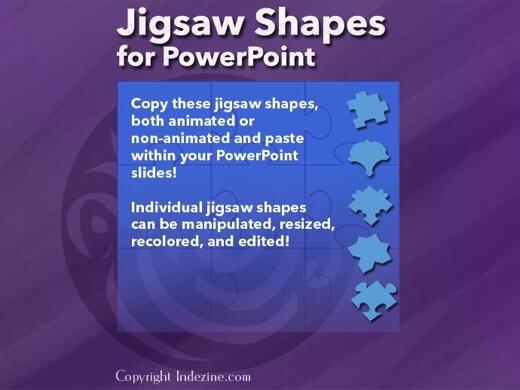
| Jigsaw Shapes for PowerPoint (Full Slide Jigsaws) |
|
| |
 |
| |
| This entire kit contains 5 different styles of jigsaw pieces: typical jigsaws, arrows, hearts, ovals, and rounded squares. Each jigsaw shape is available in three counts: small, medium, and large. We made these available in two slide sizes for both standard (4:3) and widescreen (16:9) resolutions. |
| |
| |
| |
| You can get this kit for only $9.99 |
|
| Reset Slides in PowerPoint 365 for Windows |
| |
 |
| |
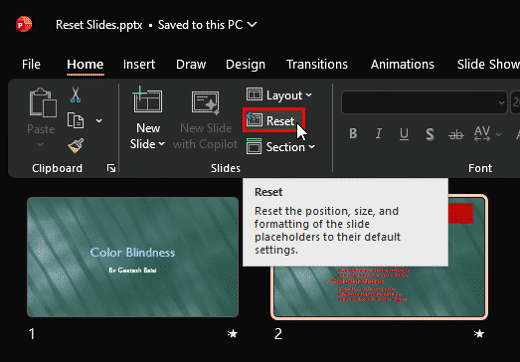
| Occasionally, you may encounter slides that are difficult to view comfortably. When slide elements don’t seem to have any visual cohesion, audiences shift their focus from the speaker to the screen, trying to interpret what they see. When that happens, the message itself becomes secondary. At this stage, the goal is to remove unnecessary formatting
and restore a simpler structure to the slide. You may also need to adjust the position, size, and text layout of the placeholders to re-establish order and clarity. Fortunately, PowerPoint offers a straightforward, one-click way to address this: the Reset option. |
| |
| Learn how to reset your slide formatting with one click in PowerPoint 365 for Windows |
|
| Quotes |
| |
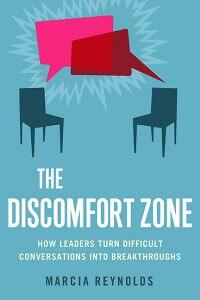
People Need To Be Aroused: by Dr. Marcia Reynolds
"People need to be aroused by surprising statements about their behavior and by questions that make them stop and think about what they are saying. If you break through their mental frames, they will stare at you for a moment as their brains look for ways to make sense of what they are considering. Then a burst of adrenaline could cause an emotional reaction, anything from nervous laughter to anger before an insight emerges. If you act on this moment by helping to
solidify the new awareness, their minds will change. If you do not facilitate this process, a strong ego may work backward to justify the previous behavior."
|
|
|
|
| Applying Theme Colors and Theme Fonts in PowerPoint 365 for Windows |
| |
 |
| |
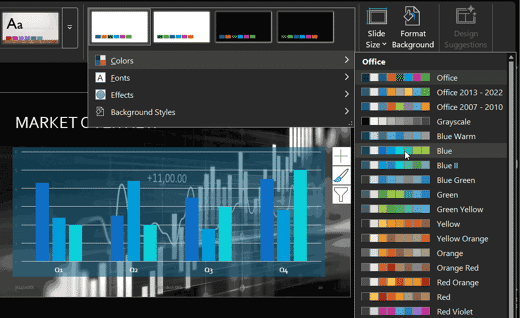
| Applying Theme Colors and Theme Fonts in PowerPoint gives you a quick, precise way to refresh your presentation’s look without committing to a full theme or template overhaul. Whether you want a subtle visual update or need to match brand guidelines, PowerPoint lets you mix and match coordinated color palettes and font pairs with ease. This tutorial
walks you through where to find these options, how to preview them, and the best ways to apply them across your slides. With a few thoughtful choices, you can elevate clarity, consistency, and visual impact in minutes. |
| |
| Learn how to apply Theme Colors and Theme Fonts in PowerPoint 365 for Windows |
|
| Indezine PowerPoint Templates |
|
|
|
|
| Medicine and Medical PowerPoint Templates |
|
|
|
|
| Legal and Law PowerPoint Templates |
|
|
|
|
| FreePPT PowerPoint Templates |
|
|
|
|
| Christian PowerPoint Templates |
|
|
|
|
| End Note |
| |
| © Indezine. Please do not reply to this message. |
| |
| Join this list |
| |
| Received this email from a friend? If you would like to receive your own copy, join our mailing list. Go here. |
|
|
| Previous issues |
| |
| Do you want to read older issues of this newsletter? Go here. |
|
|
|
| Privacy Policy |
| |
| We never share your info with anyone. Read our Privacy Policy. |
|
|
| Mail Provider |
| |
| This mailing list is powered by Aweber. |
|
|
|
| Change Subscription |
| |
| If for any reason, you no longer want to receive this newsletter with valuable tips, resources, and information about PowerPoint and presenting stuff, you can unsubscribe by clicking the link at the end of
this email. No hard feelings! |
|
|
|
|
|
|
|