|
PowerPoint and Presenting News
|
Morph in PowerPoint: Conversation with Lauren Janas

Lauren Janas is a Senior Program Manager on the PowerPoint team, where she has been working to infuse research about
the psychology of effective presenting into the experience of using PowerPoint itself to help people give better presentations. She was
the original PM for the Morph transition, which allows users to add advanced motion effects to their slides in a single click, as well as
the recent improvements to give users more control over which objects Morph. In this conversation, Lauren talks about the Morph transition.
Read the conversation here.
|
|
Slides That Are Way Cooler and More Professional
Whether you’re creating slides for presenting or creating videos, they need to look clear, modern, professional, and powerful. How much
better if they really hit home to your audience?

So I was excited when my colleague, Ellen Finkelstein, offered to show you how to create better slides in under 5 minutes!
Actually, she’s going to give you 10 slide hacks. They’re like templates and she’s going to give them away during this webinar.
Better-looking slides in less time? What’s not to like?
|
|
Presentation Management: Visual Storytelling

Visual storytelling is powerful and ancient. Throughout the course of history, literacy rates have been abysmally low. It was not
until fairly recently, in 2015, that world literacy rates rose to 86.2 percent. In the Stone Age, Neanderthals used cave drawings
to communicate with each other. One theory is that the artists described themselves and the animals around them, communicating
information that helped them survive. The cave drawings were visual stories relaying critical information.
Read more in this post by AlexAnndra Ontra, James Ontra, and
Geetesh Bajaj.
|
|
Can You Hear Me?: Conversation with Nick Morgan
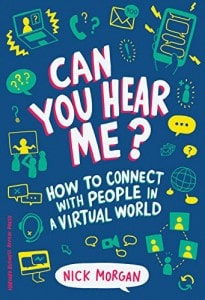
Dr. Nick Morgan is one of America’s top communication speakers, theorists and coaches. A passionate teacher,
he is committed to helping people find clarity in their thinking and ideas – and then delivering them with panache. He has
been commissioned by Fortune 50 companies to write for many CEOs and presidents. He has coached people to give Congressional
testimony, to appear in the media, and to deliver unforgettable TED talks. And he has himself spoken, led conferences, and
moderated panels at venues around the world. During the last election cycle, he provided expert commentary on the presidential
debates for CNN. His latest book is Can You Hear Me?, on the perils of virtual communication, published by Harvard in 2018.
In this conversation, Nick talks about Can You Hear Me?
Read the conversation here.
|
|
|
|
Learn PowerPoint Online for Windows
Open from OneDrive

All your PowerPoint files which are uploaded, created, or saved on OneDrive can be edited anytime, right within the
PowerPoint Online web app that runs within your browser. But that’s not the only way you can edit these PowerPoint files.
Yes, OneDrive also provides you the option to edit it within PowerPoint desktop applications. In this tutorial we’ll first
explore how to open a file in your PowerPoint desktop applications from within OneDrive. You will need to have the latest
versions of PowerPoint installed on your Windows or Mac operating systems.
|
|
Learn PowerPoint 2016 for Windows
Moving Slides Between Sections

Sections make your presentation slides easy to manage, and divide into logical parts. Also, adding and renaming Sections enables
you to categorize your presentation slides. Yet, even after dividing your slides into Sections, you will want to move slides from
one Section to another. How do you do that? Follow these steps to learn how to do so in PowerPoint 2016.
Removing Sections

To logically group your slides into parts, you should explore the Sections option in PowerPoint. Sections open up many
possibilities, and you are not just limited to adding and renaming Sections. You can also move slides from one Section to
another, change the order of Sections, or collapse/expand Sections. Of course, you can also remove a Section, as we explain here.
Reordering Sections

In PowerPoint, Sections are not just for effective and easy management of your slides, but they can also let you quickly reorder
large blocks of adjacent slides. All you got to do is to place all slides you want to reorder within a single Section, and then
move that Section.
|
|
Learn PowerPoint Online for Mac
Open from OneDrive

All your PowerPoint files which are uploaded, created, or saved on OneDrive can be edited anytime, right within the PowerPoint
Online web app that runs within your browser. But that's not the only way you can edit these PowerPoint files. Yes, OneDrive
also provides you the option to edit it within the PowerPoint desktop application on your Mac. In this tutorial we'll explore
how to open a file in your PowerPoint desktop applications from within OneDrive. You will need to have the latest versions of
PowerPoint installed on your Mac operating system.
|
|
|
|
|
|
|
|
|
|
|
|
|
|