|
|
Illuminate: Conversation with Nancy Duarte
 Nancy Duarte
 is CEO of Duarte, Inc. and the author of Resonate, Slide:ology, and the HBR Guide to Persuasive Presentations.
Her latest book, Illuminate: Ignite Change Through Speeches, Stories, Ceremonies, and Symbols, co-authored with Patti Sanchez, shows how the
world's greatest leaders use powerful communication to move people and ideas forward. She has a passion for teaching others about the power
of persuasive presentations to drive change in the world. In this conversation, Nancy talks about Illuminate.
Read the conversation here
|
Free Icon Sites

Icons are the new "in" thing for visuals. In a world where you need to be neutral all the time, icons are a Godsend since they are neutral
by nature. Another reason to use icons is because they look great in small sizes, and they also use fewer resources to display. The fact
that they go well with contemporary flat and minimal design trends: that just gets you extra brownie points!
Explore sites that provide free icons
|
New Ideas from Zeetings: Conversation with Robert Kawalsky
 Robert Kawalsky
 is the CEO and Cofounder of Zeetings, a software company changing the way people present their
ideas to the world. Kawalsky is also an active investor and advisor to technology and internet related businesses. Kawalsky
previously held the position of Portfolio Manager at Keybridge Capital where he grew and managed a portfolio of assets across
shipping, aviation, renewable energy and real estate. Kawalsky began his career at Ernst&Young, holds a Bachelor of Commerce from
the University of NSW and is a CFA Charterholder. In this conversation, Robert talks about new features and ideas at Zeetings.
Read the
conversation here
|
The Evolution of Office Themes
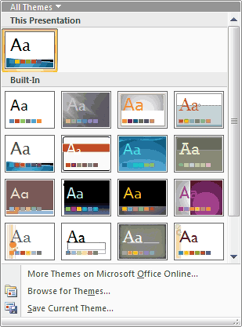
Evolution is an interesting concept because it's the change that's natural, logical, and involved. And although Themes (Office Themes) did
not exist in their present form before Office 2007 for Windows, they did evolve from the humble PowerPoint template. And as you get deeper
into how Themes work, you'll find that PowerPoint uses these Themes in amazing ways, and shares them with Word and Excel. That's the reason
they are called Office Themes rather than PowerPoint Themes.
Learn about Office Themes and how they work specifically in versions of PowerPoint on both Windows and Mac
|
Slideflight: Conversation with Georg Kremer
 Georg Kremer
 is the CEO of the Slideflight GmbH in Munich and in charge of the sales strategy of the company. Before
participating in the creation of the Slideflight GmbH, he collected diverse experiences from national and global leadership
positions in sales and marketing, at companies such as Sage, Fujitsu, Global Knowledge and Hewlett-Packard, among others. In
addition, Mr. Kremer has acquired a broad understanding of corporate cultures through various management positions in small and
medium-sized enterprises. In this conversation, Georg talks about Slideflight.
Read the conversation here
|
Learn PowerPoint 2016 for Windows
 Reuse Slides Through Drag and Drop
We explored previously how reusing your existing slides can be a great help since it saves so much of your time. While bringing up the Reuse
Slides Task Pane that enables you to add selected slides to the active presentation, there is another easier and more intuitive way to reuse
your slides. You can drag selected slides from the source presentation and drop them within the newer presentation. In this tutorial, we'll
show you how to reuse slides through this drag and drop process within PowerPoint 2016 for Windows.
Inserting a New Slide
Like many other tasks, you do in PowerPoint, inserting a new slide can be done in multiple ways. You just need to find a way that
works best for you -- the following steps show you how you can do this simple task in PowerPoint 2016.
Change Background Styles in the Slide Master
In PowerPoint 2016, the Slide Master influences the layout and look of all slides in your presentation. Make changes to the Slide Master and
those changes reflect on your presentation slides. For example, you can apply another Background Style so that all Slide Layouts and slides
in your presentation use this changed slide background. In this tutorial, we will explore how you can choose from any of the 12 available
Background Styles to apply to the Slide Master.
|
Learn PowerPoint 2013 for Windows
Create a New File with a Hyperlink
We've learnt about how hyperlinks let you do excellent stuff such as linking between slides or even linking to files outside PowerPoint.
However, did you know that you can create a hyperlink that links to a file that does not even exist! Click that hyperlink, and a new file
gets instantly created. If you are intrigued by how something so strange can happen, read further.
|
Learn PowerPoint 2016 for Mac
 Missing Developer Tab in PowerPoint 2016 for Mac
Unlike in previous versions of PowerPoint on Mac such as PowerPoint 2011, the new PowerPoint 2016 on Mac has no option to enable the
Developer tab on the Ribbon. So what about all the options within that tab? And why did Microsoft take it away? Let us learn more.
|
PowerPoint Templates on Indezine
|
PowerPoint Templates on MedicinePPT
|
PowerPoint Templates on LegalPPT
|
PowerPoint Templates on FreePPTTemplates
|
PowerPoint Templates on ChristianPPT
|
|
|
|
|
|
|
|
|
End Note
Received this email from a friend? If you would like to join our mailing list,
go here.
Read past issues of this newsletter
This newsletter provides more info on better PowerPoint usage, and presentation design. You can also opt to get
our RSS feed, where you can get updates
through Feedburner.
See our Privacy Policy.
Follow on Twitter |
Join our LinkedIn Group
| Join our Facebook Group
Do let us know how we are doing -- we love to hear from
you! And if you enjoyed reading any content on Indezine.com, please do like them on Facebook and other
social platforms, click the Google +1 buttons on all these pages, and tweet them all so that you can share
these joys with others -- and keep your feedback coming! Have a fabulous week.
Our PowerPoint and Presenting Blog is updated
daily with information
on what's new and happening in the world of PowerPoint.
The Indezine News mailing list is powered by
Aweber.
If for any reason, you no longer want to receive this newsletter with valuable tips, resources,
and information about PowerPoint and presenting stuff, you can unsubscribe by clicking the link at
the end of this email. No hard feelings!
{!global calltoaction}
|
|


