Indezine Logo


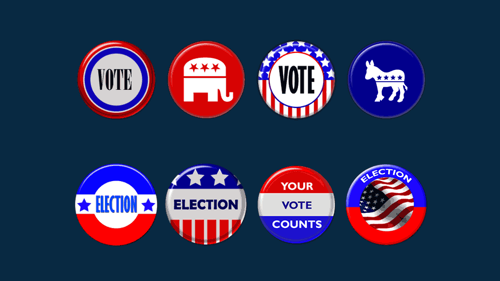
US Elections Badges

This is a sample presentation containing US Elections' badges. You’ll find 8 badges that you can use in your presentation slides.


Author:

Product/Version: PowerPoint


US Elections Badges

  • US Elections Badges
  • US Elections Badges

download Download (1.69 mb)


See Also: More US Elections PowerPoint Badges | US Elections PowerPoint Templates | Premium US Elections PowerPoint Templates


These US Elections badges are versatile visual elements you can use to add a patriotic touch and thematic clarity to PowerPoint slides. Here's how they might enhance your presentation:

Uses for US Elections Badges in PowerPoint

  • Title Slides: Kick off your presentation with a badge that sets the tone—especially for civic events or election discussions.
  • Section Dividers: Use them to visually separate content, like voter education, campaign topics, or historical overviews.
  • Callouts & Highlights: Pair a badge with key facts or quotes to draw attention and add credibility.
  • Interactive Quizzes or Polls: Make slides engaging by framing questions or options with a relevant badge.
  • Infographics: Enhance election stats or timelines with badges as markers or legends.

These badges work well in educational sessions, community outreach, or even classroom projects.

More Sample Presentations

You May Also Like: 16 Design Tips for Beautiful Presentations | How to Use Fairy Stories to Boost Your Business

Popular Posts

Create Animated GIFs from PowerPoint Slides
Explore ways to create animated GIFs from PowerPoint slides.

PowerPoint Tutorials
These PowerPoint tutorials have many screen shots that show you exactly what you see in your computer!

Use Safe Fonts Available on All Systems in PowerPoint
Learn about using safe fonts in PowerPoint.

10 Tips for Pecha Kucha
Read 10 amazing Pecha Kucha tips that will help you create and deliver a better Pecha Kucha presentation.


Feature List 01 (Layout with Tabs)

The Feature List Layout comprises three sample PowerPoint presentations: one each to create a visual list for 4 features, 5 features, and 6 features. These work great when you have too much information to fit within one slide. This solution lets you use multiple slides, but the visual result is still that of one single slide!

Buy and Download Feature List 01 (Layout with Tabs) for $4.99+ (671 kb)


Microsoft and the Office logo are trademarks or registered trademarks of Microsoft Corporation in the United States and/or other countries.

Home | PowerPoint | Photoshop | PowerPoint Templates | PowerPoint Tutorials | Blog | Notes | Ezine | Media Kit | Feedback | Site Map | About Us | Contact Us

Link to Us | Privacy | Testimonials

PowerPoint Backgrounds | Christian PowerPoint Backgrounds | Business PowerPoint Presentation Templates

Plagiarism will be detected by Copyscape

©2000-2025, . All rights reserved.