
This is the print version of this page. All content is copyright Indezine.com 2000-2026.
Read the Indezine review of PPTminimizer.
Author: Geetesh Bajaj
Product/Version: PowerPoint
Introduction
About PPTminimizer
Download and Installation
Using PPTminimizer
Pricing and Support
Conclusion
PowerPoint is almost a synonym for the word presentation these days -- and presentation file sizes can be huge. True, you could convert your presentation to another format like Flash SWF, but that brings its own share of problems -- like losing the ability to make any changes in future. That's where PowerPoint compression software like PPTminimizer steps in -- this product lets you optimize multiple presentations into different compression levels without changing the format.
BackPPTminimizer is from Bernard D&G, a German company that also creates several other products such as TurboDemo. You can download a free trial version of PPTminimizer from their site.
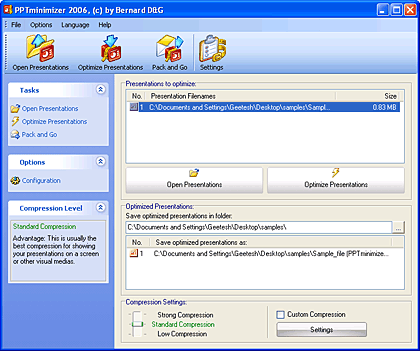
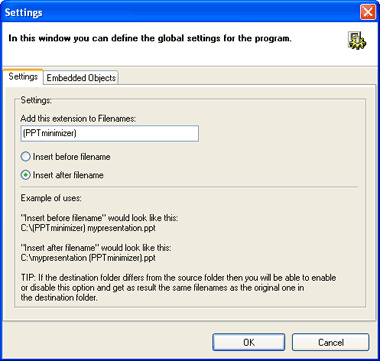
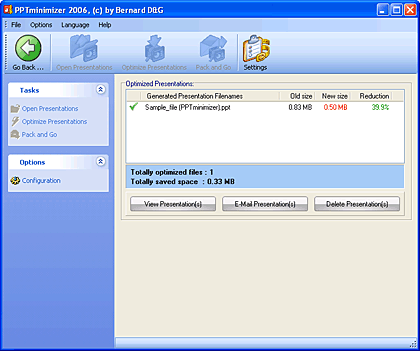
PPtminimizer leaves the original PowerPoint file unaltered -- it creates a new file with a suffix of PPTminimizer and allows you to send the optimized presentation via e-mail with a single click.
My contact at PPTminimizer for this review was Sophia Taoutaou - thank you, Sophia.
BackDownload the installer from the link given above, run the setup routine and follow the instructions. You'll end up with an PPTminimizer program group in your Windows Start menu, as shown in Figure 1, below.

Figure 1: The PPTminimizer Start Menu Group
When you run it for the first time it will ask for your registration details (the serial number) -- alternatively, you can run the product in evaluation mode that allows you to do 12 free conversions.
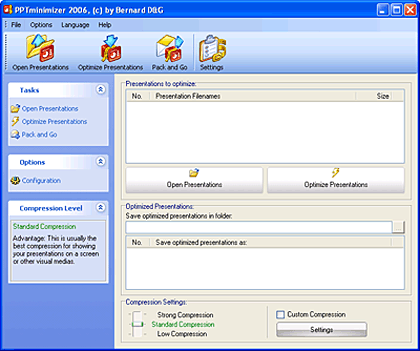
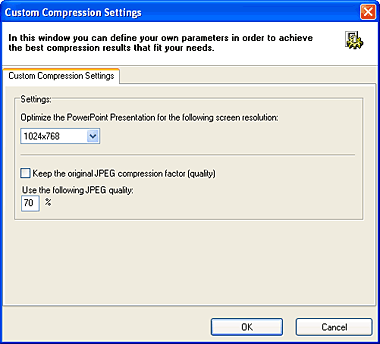
BackWhen installed, follow these steps to compress a PowerPoint file using PPTminimizer.

PPTminimizer costs $29.95 for a single-user license, discounts are available for multiple-user and educational licenses.
Email support is complemented by a small online FAQ.
BackAt $29.95, PPTminimizer can be a good deal, especially if you often run into huge presentation sizes.
BackYou May Also Like: Madagascar Flags and Maps PowerPoint Templates | InterActiv Presentation Wizard


Microsoft and the Office logo are trademarks or registered trademarks of Microsoft Corporation in the United States and/or other countries.
