Home     PowerPoint     Photoshop     Photos     Other     Studio     Info

Bookmark and Share  


Knoll Light Factory 3.0

Reviewed: Geetesh Bajaj

Date Created: January 10th 2008
Last Updated: February 27th 2009


Product Showcase


Introduction

Knoll Light Factory 3.0 is a Photoshop compatible plug-in that allows you to design photo-realistic and enhanced lighting effects. This Photoshop plug-in adds flares, sparkles, rays, and several other natural lighting types to any image.

Knoll Light Factory presents an intuitive user interface that includes controls for applying the premade flares. A custom flare editor lets you create and edit your own custom effects. The plug-in makes a very easy task of constructing naturalistic lens flares by combining any of the 19 different elements that occur when photographing lights and bright objects.

Knoll Light Factory 3.0 is from Digital Anarchy, a company based in San Francisco, California, United States that specializes in special effect filters for image editing and video programs.

You can download a free trial version of Knoll Light Factory from the Digital Anarchy site...

My contact at AKVIS for this review was Debbie Rich, thank you Debbie Rich.

Back


How To Use

Here’s how you can use Knoll Light Factory:

  1. Open any image in an image editor such as Adobe Photoshop.

  2. Choose Filter | Digital Anarchy | Knoll Light Factory, as shown in Figure 1.

    Knoll Light Factory
    Figure 1: Knoll Light Factory

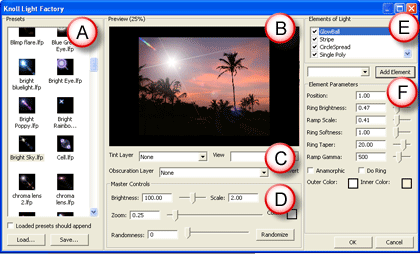
  3. This will open the Light Factory interface that you can see in the Figure 2 below. Figure 3 is the Mac interface

    Knoll Light Factory Interface
    Figure 2: Knoll Light Factory

    Knoll Light Factory mac interface
    Figure 3: Knoll Light Factory Mac -- partial interface

    The interface divided into four areas, as explained below:

    1. Presets has pre-designed combinations of Light Elements. There are over 110 presets and they are all accessible through the Preset Manager. You can also create your own presets.

    2. Preview Window is where you see your light design build and take shape.

    3. Layer Options display and create an interaction with the source Photoshop file.

    4. Master Controls contains parameters that influence the light effects which has build in the Preview Window.

    5. Elements of Light shows the list of different light elements that make up your light effect.

    6. Element Parameters provdes options to apply changes for the selected light element within the list.
  1. After selecting the light preset, and/or making the changes as required, click OK to apply.

Note: The effects are not limited to the picture, these effects can be applied on a plain background also. However, there are no options to apply these lights to a transparent background.

Here is a basic before and after sample.

Back


Specifications


Photoshop Versions:

7+

Platforms:

Windows, Mac

Site:

Digital Anarchy

Price:

US$149

Trial Version:

Available

Back


Featured Story

Adobe Captivate's Edit View

In an earlier post last week, I discussed Adobe Captivate's views and compared them to PowerPoint's deafult views. I also explained about the Storyboard View. In this post, I'll look at Captivate's Edit view, which in many ways is similar to PowerPoint's Normal view. If you are not already in Edit view within Captivate, choose the View drop-down in the toolbar, and select Edit View.

Learn more here...


Featured Book

PowerPoint 2007 Complete Makeover Kit

PowerPoint 2007 Complete Makeover Kit
PowerPoint 2007 Complete Makeover Kit is out! Check the book on Amazon.com...

And here are some free excerpts...


Home |  PowerPoint |  Photoshop |  Templates |  Blog |  Notes |  Ezine |  Studio |  Advertise |  Feedback |  Info |  Site Map
Store  |  RSS |  Privacy |  Testimonials
Free PowerPoint Backgrounds | Free PowerPoint Templates | Free Christian PowerPoint Backgrounds
Page copy protected against web site content infringement by Copyscape
  Page copy protected against web site content infringement by Copyscape


  ©2000-2009, Geetesh Bajaj. All rights reserved.

    since November 02, 2000