|
|
|
| |
| May 12, 2026 |
| PowerPoint and Presenting News |
|
| Vision Meets Presentation |
| |
| |
| This issue explores how strategy, visibility, and confident delivery work together in modern presentations. We begin with a conversation with David Tang on balanced scorecards and strategy maps, where complex goals become visual roadmaps that help organizations align priorities and measure success more
effectively. We then shift to Nancy Ancowitz’s insights in Zoom to Success, highlighting how presenters can build stronger presence and connection in virtual environments. Finally, we revisit PowerPoint’s Presenter View, a feature that helps speakers stay organized, focused, and in control while delivering to their audience. Together, these stories remind us that successful presentations combine strategic thinking, audience awareness, and thoughtful execution. |
| |
|
| Balanced Scorecard and Strategy Maps on KPI Depot: Conversation with David Tang |
| |
 |
| |
| David Tang is the founder of Flevy, the marketplace for business best practices–the same as those produced by top-tier consulting firms and used by Fortune 100 organizations. Flevy is the largest library of best practice documents available online. Prior to Flevy, David worked as a management consultant, where his clients ranged
from startups to Fortune 15. David has a MEng and BS in Electrical & Computer Engineering from Cornell University. After Flevy, David created specialized sites such as PPT Depot and KPI Depot. In this conversation, David talks about Balanced Scorecard and Strategy Maps on KPI Depot. |
| |
| Read the conversation here |
|
| Feature List 01 (Layout with Tabs) |
|
| |
 |
| |
| The Feature List Layout comprises three sample PowerPoint presentations: one each to create a visual list for 4 features, 5 features, and 6 features. These work great when you have too much information to fit within one slide. This solution lets you use multiple slides, but the visual result is still that of one single slide! |
| |
| |
| |
| Buy and Download Feature List 01 (Layout with Tabs) for $4.99+ (671 kb) |
|
| Zoom to Success: Conversation with Nancy Ancowitz |
| |
 |
| |
| Nancy Ancowitz is a career strategist, NYU career director, and author of Self-Promotion for Introverts®, Business Writing: Say More With Less, and Zoom to Success: Present Like a Pro. She helps professionals communicate with clarity and presence in high-stakes settings. She has had bylines in The New York Times and The Wall Street
Journal, and writes for Psychology Today and The Times of Israel. In this conversation, Nancy talks about her new book, Zoom to Success: Present Like a Pro. |
| |
| Read the conversation here |
|
| Quotes |
| |
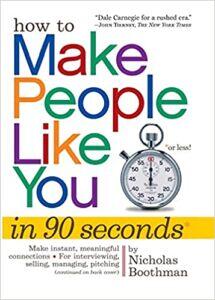
Magazine ads have less than two seconds: by Nicholas Boothman
"I knew from 25 years of shooting still photographs for magazines all over the world that attitude and body language are paramount in creating a strong visual impression—magazine ads have less than two seconds to capture the reader’s attention."
|
|
|
|
| Presenter View in PowerPoint 365 for Windows |
| |
 |
| |
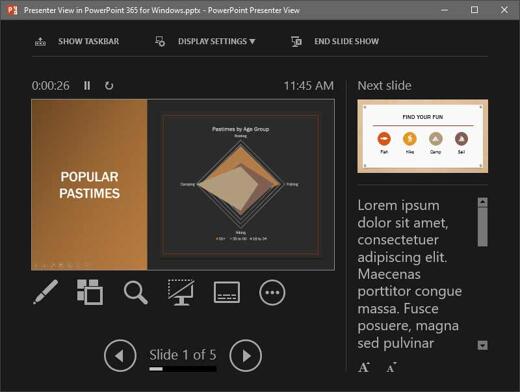
| Presenter View in PowerPoint 365 for Windows is a purpose-built view that accompanies Slide Show view. This view is beneficial in an environment that has at least two displays such as a laptop and a projector, or even two monitors attached to your desktop system. The projector or the secondary display then shows the actual slides, in what is
commonly called Slide Show view. However, you see Presenter view on the laptop or on the primary display. |
| |
| Learn about Presenter view in PowerPoint 365 for Windows |
|
| Indezine PowerPoint Templates |
|
|
|
|
| Medicine and Medical PowerPoint Templates |
|
|
|
|
| Legal and Law PowerPoint Templates |
|
|
|
|
| FreePPT PowerPoint Templates |
|
|
|
|
| Christian PowerPoint Templates |
|
|
|
|
| End Note |
| |
| © Indezine. Please do not reply to this message. |
| |
| Join this list |
| |
| Received this email from a friend? If you would like to receive your own copy, join our mailing list. Go here. |
|
|
| Previous issues |
| |
| Do you want to read older issues of this newsletter? Go here. |
|
|
|
| Privacy Policy |
| |
| We never share your info with anyone. Read our Privacy Policy. |
|
|
| Mail Provider |
| |
| This mailing list is powered by Aweber. |
|
|
|
| Change Subscription |
| |
| If for any reason, you no longer want to receive this newsletter with valuable tips, resources, and information about PowerPoint and presenting stuff, you can unsubscribe by clicking the link at the end of
this email. No hard feelings! |
|
|
|
|
|
|
|