|
|
|
| |
| April 21, 2026 |
| PowerPoint and Presenting News |
|
| Clarity Through Choice |
| |
| |
| In this issue, we explore how what you show, and what you choose not to show—shapes every presentation. From the practical skill of hiding and unhiding slides, we learn how to keep content focused while still keeping valuable backup material within reach. Hidden slides act
as a “backstage area,” letting presenters
stay flexible without overwhelming their audience. Alongside this, we draw inspiration from Isabel Allende’s thoughts on creativity, reminding us that expression thrives on both discipline and imagination. Finally, we revisit the importance of visual awareness through color perception, showing that even small design choices influence how messages are received. Together, these ideas highlight the balance between control, creativity, and clarity. |
| |
|
| Hide and Unhide Slides in PowerPoint 365 for Windows |
| |
 |
| |
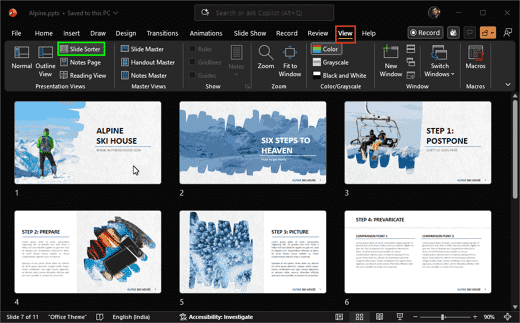
| Ever created a slide that you just couldn’t delete? It’s like a “just-in-case” drawer in your presentation. You may not use it often, but you know it could come in handy. Now imagine you’re presenting and moving through your slides, and suddenly that drawer opens in front of everyone. Notes, extra data, maybe even unfinished thoughts show up on the
screen. Not a great moment. So, in this tutorial, we will explore the entire gamut of hiding and unhiding slides, learn about pro tips, and look at some caveats. |
| |
| Learn how to hide and unhide slides in PowerPoint 365 for Windows |
|
| Organic Shapes with Brush Edges |
|
| |
 |
| |
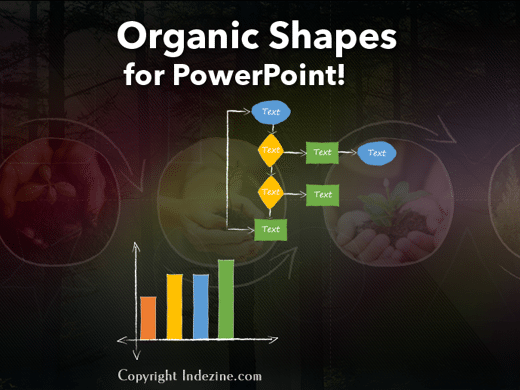
| You get 8 shape types plus lines as part of this Organic Shapes collection. Each of these 8 shape types have 10 variants. So you end up with 80 hand-drawn shape options! Again each of these 80 shapes have 12 brush stroke styles! Plus you get the lines and arrows in 12 brush stroke styles too. Combine all variations to end up with more than 3000
possibilities. |
| |
| |
| |
| Buy and Download for $99+ (83 MB) |
|
| Isabel Allende on Creativity |
| |
 |
| |
| Isabel Allende, the famous Chilean author whose more than 20 books have sold more than 67 million copies in 35 languages, is an excellent role model for the creative process. I had the rare opportunity to meet and chat with Allende at a book-signing event for her latest novel, Violeta. In an effort to learn from a master writer, I
asked her whether she followed Stephen Covey’s advice about beginning with the end in mind. Does she know how her novels will end when she begins to write? |
| |
| Read more with Jerry Weissman |
|
| Test Your Color Sense |
| |
 |
| |
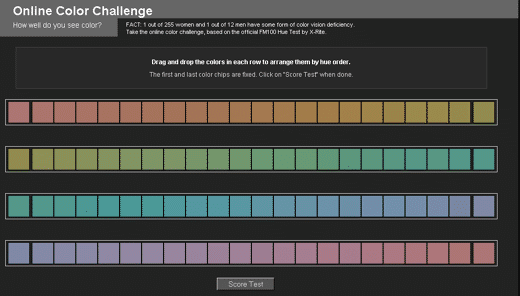
| Here’s a cool site called the Online Color Challenge that ascertains how well you see color, and how much you can differentiate between the various hues of a color as it evolves from one value to another. In its original form, this site contains four self-contained rows of jumbled-up color chips that you need to drag and place so that each color
chip is suitably similar to the ones before and after them. This example demonstrates how the color chips were rearranged, even though the result is not entirely correct. |
| |
| Learn more here |
|
| Indezine PowerPoint Templates |
|
|
|
|
| Medicine and Medical PowerPoint Templates |
|
|
|
|
| Legal and Law PowerPoint Templates |
|
|
|
|
| FreePPT PowerPoint Templates |
|
|
|
|
| Christian PowerPoint Templates |
|
|
|
|
| End Note |
| |
| © Indezine. Please do not reply to this message. |
| |
| Join this list |
| |
| Received this email from a friend? If you would like to receive your own copy, join our mailing list. Go here. |
|
|
| Previous issues |
| |
| Do you want to read older issues of this newsletter? Go here. |
|
|
|
| Privacy Policy |
| |
| We never share your info with anyone. Read our Privacy Policy. |
|
|
| Mail Provider |
| |
| This mailing list is powered by Aweber. |
|
|
|
| Change Subscription |
| |
| If for any reason, you no longer want to receive this newsletter with valuable tips, resources, and information about PowerPoint and presenting stuff, you can unsubscribe by clicking the link at the end of
this email. No hard feelings! |
|
|
|
|
|
|
|