
|
PowerPoint and Presenting News
|
Smile and Relax

What type of talks do you give? Are they about diseases? Are they about laying people off? Are they about problems in people’s
lives? If so, then you should not smile during your presentation. Smiling when discussing serious or life-threatening situations
is obviously inappropriate. But most of us do not give those types of talks — yet many people never, ever, crack a smile.
Learn more from Claudyne Wilder.
|
|
Jigsaw Shapes for PowerPoint Presentations

Here are a bunch of jigsaw slides that you can use to create your own jigsaw puzzles quickly within your own slides! This entire kit
contains 5 different styles of jigsaw pieces: typical jigsaws, arrows, hearts, ovals, and rounded squares.

Each jigsaw shape is available in three counts: small, medium, and large. These shapes can be used in any PowerPoint version that
is released till date. We made these available in two slide sizes for both standard (4:3) and widescreen (16:9) resolutions. Detailed
instructions on how to use these shapes can be found within the download you buy.
Download and use jigsaw shapes in your slides now for just $9.99.
|
|
iSpring Suite eLearning Authoring Toolkit for PowerPoint: Conversation with Slava Uskov

Slava Uskov is VP of Product Development at iSpring Solutions, an eLearning software company. Together with his team,
he defines the product strategy and roadmap, conducts thorough market and customer research, and decides on new features based on actual
user needs. In today’s conversation, Slava talks about the new iSpring Suite 9 and how it helps PowerPoint users create robust eLearning
courses and assessments right in their preferred authoring tool.
Read the conversation here.
|
|
Stage Fright

In the prior blog, you read about how the hero of the Hollywood film, Limitless, cures his writer’s block with a new drug that
stimulates his creative capabilities. Concurrent with the film’s opening, a related article about creative paralysis appeared in the New
Yorker magazine. Staff writer Dana Goodyear profiled Barry Michels, a real life therapist who treats blocked Hollywood screenwriters
with his own unique methodology derived from the concepts of Jungian psychology. Mr. Michels, whose starting rate is $365 an hour, also
treats the stage fright that movie colony writers and other creative people face when they have to pitch their ideas—a subject near and
dear to the solar plexus of every presenter.
Read more with
Jerry Weissman.
|
|
|
|
Learn PowerPoint
Widescreen Implementations

PowerPoint’s implementation of the Widescreen aspect ratio has changed somewhat over the last few versions. Although this is a
small change, it is important to understand what is happening behind the scenes.
|
|
Learn PowerPoint 2016 for Mac
Format Task Panes
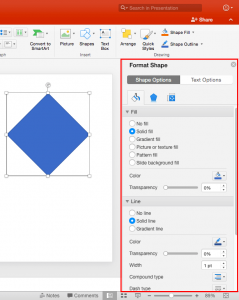
PowerPoint works with the concept of selection, and then action. And the action typically is to edit whatever you may have selected!
For such editing, the Format Task pane in PowerPoint 2016 for Mac can be indispensable. The Format Task pane aligns neatly within the
interface in PowerPoint 2016 for Mac, and you can now immediately see how your choices affect selected slide objects.
Move Text Boxes on a Slide

This tutorial is about moving text boxes rather than text placeholders. Typically text placeholders for regular text content
or even slide titles are located in the same position on successive slides. So, if you really do need to move a text placeholder,
do it within the Slide Master so that this change of position happens on all slides, providing a consistent look to your
presentation. In this tutorial, you will learn how you can move text boxes within the Slide Area in PowerPoint 2016 for Mac.
|
|
Learn PowerPoint Online
Types of Shapes

What does the word “shape” mean to you? Do you imagine a square, a circle, a heart, or even a smiley face? Yes, all those are shapes,
as are the hundreds of other recognizable outlines or figures that we call shapes in our daily conversations. Shapes play a
significant role within slides you create for your PowerPoint presentation. In more ways that you may want to count, shapes are like
the building blocks of almost anything you do on your PowerPoint slides. PowerPoint Online provides hundreds of shapes efficiently
categorized into 8 types. You can do so much with these shapes such as formatting them with fills, lines, and effects.
Hide/Unhide Slides

Do you have a secret slide with useful information that you would rather not delete? But what if you show this slide to your
audience inadvertently? How do you cope with this problem? The solution is easy: you just hide the slide. Hidden slides don’t
show up in Slide Show view, but they are still available to edit and to possibly unhide when you are ready to show that slide to
the world.
|
|
|
|
|
|
|
|
|
|
|
|
|
|


