|
PowerPoint and Presenting News
|
Animate 3D Models in PowerPoint Without Morph
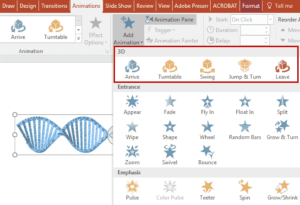
We explored how you can add 3D objects in PowerPoint using the new 3D feature available to Microsoft Office 365 subscribers. But until now, any movement
happened using the Morph transition effect. And herein lay the problem: this seemed like a workaround. And now it seems true that this was indeed a
workaround because Microsoft just introduced real 3D animations in PowerPoint. At the time of writing, these animations are only available to Office
Insider subscribers of Office 365. Both Office Insider Slow and Office Insider Fast rings have access to these animations.
Learn more here.
|
|
Udemy Courses: Learn Something New

Want to learn a new skill, a new program, or do you
want to look into self-improvement? You are in luck. Why? Because our friends at
Udemy, the leading provider of online video courses
has slashed the rates of many of their courses to just $15. Many courses that cost more than $200 are now only $15.

And even better, you can just buy these courses now, and decide to view the courses whenever you want - maybe today, maybe next week,
or next year, or when you retire! How is that possible? Because
Udemy courses do not expire, and you can access
them for a lifetime.
Get these Udemy courses at slashed prices!
|
|
Kite Silhouette Graphics for PowerPoint

Kites fly in the skies, and are almost an analogy for upliftment and looking upwards towards progress and success. We bring you PowerPoint-ready kite shapes in
four variations.
These Kite shapes are already placed within slides and are available in both black and white. Do remember though that they can be recolored using PowerPoint's
native options for fills, lines, and effects. Just copy the Kite shape you like and paste into another PowerPoint slide, or even a Word document or Excel
worksheet. All these Kite shapes are vector shapes, so you can easily edit them within your Microsoft Office program, and resize them without losing sharpness
or clarity.
Explore and get these kite graphics for PowerPoint.
|
|
Seasons and Events: Sankranti

As per Indian traditions, Sankranti is the day that denotes the transmigration of the sun from one zodiac constellation to another. Thus, Sankranti happens
twelve times a year. However, most people refer to Makar Sankranti, a day when the sun transitions into the Capricorn constellation as Sankranti. Sankranti,
which is also known by many other names in various parts of India is a popular harvest festival that symbolizes prosperity and the change of seasons.
Explore
Sankranti PowerPoint templates, embellishments, Snagit stamps and more stuff.
|
|
Slider App: Conversation with Gregory Art

Gregory Art is the co-founder of Slider, along with Sergey Balashov and Artem Riabukha. This Slider App is one of the projects of
design agency, Artrange Digital. Gregory, a former artist and now a web-developer failed previously in his other app called Starckets, but that
experience enriched his expertise and helped him with Slider App. In this conversation, Gregory talks about Slider App.
Read the conversation here.
|
|
|
|
Learn PowerPoint 2016 for Mac
Duplicate Slides

Why would anyone want to duplicate slides? There are many reasons to do so. For example, you may want to create another slide that is similar to what you
already have. Or you may need to use the same slide twice. Or perhaps create a slightly different table or chart than what you already have on an existing
slide. Duplicating and editing slides is easier than redoing it from scratch. Whatever your reasons may be, it is easy to duplicate slides in PowerPoint 2016
for Mac in both the Slides Pane and Slide Sorter View.
|
|
Learn PowerPoint 2013 for Windows
Identify 32-Bit or 64-Bit in PowerPoint and Office

Sometimes, you want to know whether you are running a 32 or 64-bit version of PowerPoint or Office. Yes, if you are running a 32-bit version of Windows,
then there's no ambiguity in the fact that you have to be running a 32-bit version of Office. But if you are running a 64-bit version of Microsoft Windows,
you may be running a 32 or a 64-bit version of Office. It is not uncommon for sysadmins and even users to run 32-bit Office within a 64-bit Windows
environment. Why? That's because there are add-ins for Office products that may not work in a 64-bit version of Office. Or you may have another reason.
Luckily, it's easy to identify 32-bit or 64-bit if you know where to look.
|
|
Learn PowerPoint 2010 for Windows
Replace Fonts

Are you stuck with a presentation that uses strange fonts? Or have you inherited slides where you need to change fonts globally? Fortunately, you don’t have to
replace fonts, one at a time with each text box, placeholder, or shape. In this tutorial, we will explore how you can replace one font with another, in the
entire presentation using PowerPoint 2010.
|
|
Learn PowerPoint
Download and Install the STAMP Add-in

The STAMP add-in is designed for PowerPoint 2016, 2013 and 2010, and is a subtitling add-in for video and audio files. This tutorial will help you
downloading the add-in and installing it. Go to the SourceForge STAMP PowerPoint Add-In web page. Follow the steps in the installation wizard. When done
with the installation wizard, verify that the add-in installed correctly by opening PowerPoint.
|
|
|
|
|
|
|
|
|
|
|
|
|
|