|
PowerPoint and Presenting News
|
Single and Double-Byte Fonts in PowerPoint

A reader once described the PowerPoint double-byte font scare as a poisonous king cobra snake! Sooner or later, you will see PowerPoint look at you like a
cobra that’s showing its fangs, and is ready to bite. You want to make sure you are not bitten, and wouldn’t it be nice if the cobra quietly goes back to its
hole and rests there in peace and leaves you alone?
Learn more
here.
|
|
Udemy Courses: Learn Something New

Want to learn a new skill, a new program, or do you
want to look into self-improvement? You are in luck. Why? Because our friends at
Udemy, the leading provider of online video courses
has slashed the rates of many of their courses to just $15. Many courses that cost more than $200 are now only $15.

And even better, you can just buy these courses now, and decide to view the courses whenever you want - maybe today, maybe next week,
or next year, or when you retire! How is that possible? Because
Udemy courses do not expire, and you can access
them for a lifetime.
Get these Udemy courses at slashed prices!
|
|
The Importance of Behavioral Flexibility in Leadership

Successful leadership is built upon four practices: Establishing a clear vision; sharing that vision with others, in a clear and compelling way; providing
others with the resources to realize that vision; and coordinating, the sometimes conflicting, interests of all stakeholders
But there is a fifth, often overlooked characteristic; the need for leaders to be able to flex their style, dependent on the situation. A business with
its back against the wall, requires a different style to one which is enjoying a profitable, steady state.
Read more with Ally Yates.
|
|
Show Off Your Expertise in an Impressive Presentation

Over your career, you develop expertise. But is your expertise recognized? You won’t gain the recognition you deserve until you demonstrate what you
know in a compelling way. One of the best vehicles is an impressive presentation where you communicate your knowledge.
Laura
Bruce explains more.
|
|
|
|
Learn PowerPoint 2016 for Windows
Presenter View

PowerPoint 2016’s Presenter View is a purpose-built view that accompanies Slide Show view. This view is beneficial in an environment that has at least two
displays such as a laptop and a projector. The projector then shows the actual slides – that is what we commonly call Slide Show view. However, you see the
Presenter view on the laptop. In Presenter view, you get to see much more than just the slide — rest assured that the audience viewing the projector output see
only the slide!
Print Option in Backstage View

Among the tabs within Backstage View, we have already explored some options such as Open, New, Save, etc. In this tutorial, we will explore the Print option
used to print the current presentation in the form of selected slides, notes pages, handouts, etc. Follow these steps to learn more about Print options within
Backstage view in PowerPoint 2016.
|
|
Learn PowerPoint 2016 for Mac
Notes Pane

PowerPoint 2016 for Mac's tri-paned interface has three regions: the Slides Pane, the Slide Area, and the Notes Pane. The Notes Pane is placed right
below the Slide Area. The Notes Pane provides space to add speaker's notes that can be so helpful to the presenter while presenting. You can also write
any sort of information about the presentation or individual slide.
|
|
Learn PowerPoint Online
Views
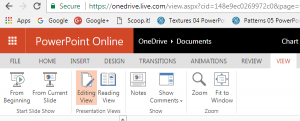
Your slides remain the same, yet the various views in PowerPoint make exploring those same slides a little different. This approach makes sense because
viewing slides in Slide Show view gives an entirely different perspective than editing them in Editing view. Further, it's easier to skim through your slides
in Reading view, and then make changes to individual slides in Editing view. All put together, PowerPoint Online provides you with three different views.
|
|
|
|
|
|
|
|
|
|
|
|
|
|