|
|
|
| |
| February 22, 2022 |
| PowerPoint and Presenting News |
|
| Insert a Check Mark or Tick Mark in PowerPoint for Windows |
| |
 |
| |
| Do you want to insert a check mark, which is also called a tick mark or a tally mark, in your PowerPoint slides? Very often, this symbol indicates a task that’s done, an answer that’s correct, or something that’s checked or verified. You may want to add this check or tick symbol as part of your regular text in text placeholders and boxes, shapes, tables, and even charts. Fortunately, it is very easy to complete this task in most versions of PowerPoint for Windows. |
| |
| Learn how you can insert a check mark or tick mark in PowerPoint for Windows |
|
| Life’s too short for lousy presentations |
| |
 |
| |
Life’s too short for lousy presentations. Fortunately, you can learn from so many industry stalwarts at the upcoming Present to Succeed 2022 virtual conference, being held from April 7 to 8, 2022.
Register now! Indezine readers can save an amazing 30% with promo code: INDEZINE
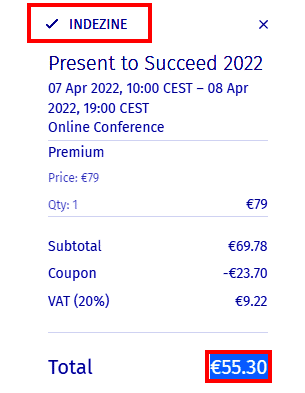
For example, if you choose the Premium tier, the normal price will be €79. Then, you can add the promo code to get 30% off! You end up paying only €55.30 rather than €79. But hurry and snap these tickets now, because prices could increase very soon. Also, presently there is a Buy One, Get One offer that you should not miss. |
|
| Changing Proofing Language for an Entire Presentation in PowerPoint 365 for Windows |
| |
 |
| |
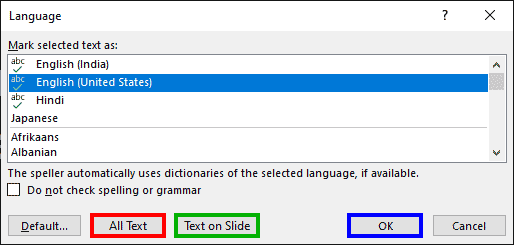
| While it is easy to change the proofing language for selected text containers, doing so one text container at a time can be a great time-waster, especially if you need the language changed across all content in many slides. There are three ways to set the proofing language for your entire presentation, and you can use one or more of these approaches. Make sure you have the proofing tools installed for all or any of the languages that you need to work within PowerPoint. |
| |
| Learn how to set proofing language for an entire presentation in PowerPoint 365 for Windows |
|
| Research Tools in PowerPoint 365 for Windows |
| |
 |
| |
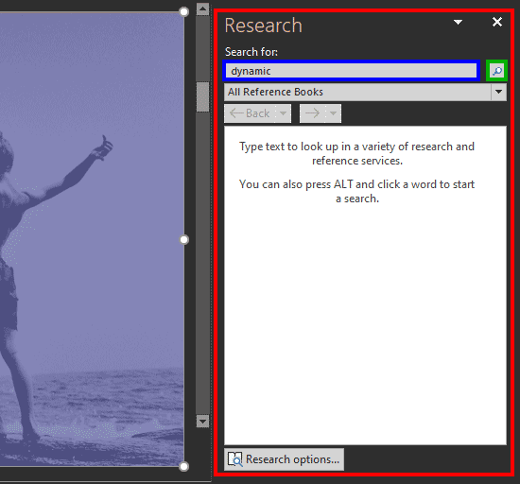
| Creating a slide deck, and you suddenly want to authenticate a figure or double-check a fact? Well, there's no need to open a web browser or even access a conventional dictionary because PowerPoint includes the Research Task pane. Unfortunately, there is no button available in the Review tab of the Ribbon, but you can still access the Research Task pane and do everything possible in previous versions of PowerPoint, as we explain on this page. |
| |
| Explore Research tools to connect with websites, translations, and more in PowerPoint 365 for Windows |
|
| Indezine PowerPoint Templates |
|
|
|
|
| Medicine and Medical PowerPoint Templates |
|
|
|
|
| Legal and Law PowerPoint Templates |
|
|
|
|
| FreePPT PowerPoint Templates |
|
|
|
|
| Christian PowerPoint Templates |
|
|
|
|
| End Note |
| |
| © Indezine. Please do not reply to this message. |
| |
| Join this list |
| |
| Received this email from a friend? If you would like to receive your own copy, join our mailing list. Go here. |
|
|
| Previous issues |
| |
| Do you want to read older issues of this newsletter? Go here. |
|
|
|
| Privacy Policy |
| |
| We never share your info with anyone. Read our Privacy Policy. |
|
|
| Mail Provider |
| |
| This mailing list is powered by Aweber. |
|
|
|
| Change Subscription |
| |
| If for any reason, you no longer want to receive this newsletter with valuable tips, resources, and information about PowerPoint and presenting stuff, you can unsubscribe by clicking the link at the end of this email. No hard feelings! |
|
|
|
|
|
|
|