|
PowerPoint and Presenting News
|
Show Some Love to PowerPoint Tables

Yesterday I did a rush cleanup job on a nasty deck of slides for a client, and today, I got a thank you email that said: "There is
one thing I must ask you. How do you get your tables to format with such a light design (the lines of the table)?" So this is what I
do to get the light-colored lines.
Learn more with Echo Swinford.
|
|
Polygon Center Circles for PowerPoint

These special circles have polygon centers: the centers are made of triangles, squares, pentagons, and hexagons! And based on
the sides of the polygon, the rest of the circle has that many segments.

You can use these Polygon Center Circles in any slide that needs to show 3, 4, 5, or 6 segments. Suitable themes for such
multiple segments include Unity, Continuity, Synchronization, etc.

Remember that the individual segments within the entire graphic Buy Now are all native PowerPoint shapes that are individually
selectable. They break the monotony of text heavy slides, and help you explain concepts better to your audiences. What's more,
these shapes are also so much fun to use!
Download and use these Polygon Center Circles in your slides for just $4.99
|
|
Canva’s Acquisition of Pixabay and Pexels: Conversation with Anna Guerrero

Anna Guerrero is head of Marketplace at Canva, an online design and publishing tool which makes graphic design simple for
everyone. Since launching in 2013, Canva has grown to over 15 million users across 190 countries, with more than 1 billion designs created, at
36 designs per second. Today Canva is growing from strength the strength, with over 600 team members across 3 offices in Sydney,
Manila and Beijing, working together on a mission to empower everyone to create beautiful designs. In this conversation, Anna talks
about Canva’s recent acquisition of community photo sharing sites, Pixabay and Pexels.
Read the conversation here.
|
|
Presentation Procrastinators: 02

As terrific as this managed “presentation polyana” sounds, the reality is that there will inevitably be last minute edits,
high-stress crises, and countless long hours as the clock counts down to showtime. Managers changing the whole deck around.
Executives calling on you to update tables, graphs, and text. Presenters who are finally giving you the time, attention,
and respect you had been begging for weeks earlier.
Read more here.
|
|
Presentation Summit 2019: Conversation with Rick Altman

Rick Altman has been hired by hundreds of companies, listened to by tens of thousands of professionals, and read
by millions of people, all of whom seek better results with their presentation content and delivery. He covers the whole of the
industry, from message crafting, through presentation design, slide creation, software technique, and delivery. He is the host of
the Presentation Summit, now in its 17th season as the most prominent learning event for the presentation community. In this
conversation, Rick talks about
the Presentation Summit
, being
held in San Antonio, TX this year from October 6 to 9, 2019.
Read the conversation here.
|
|
Presentation Summit 2019: Conversation with Matthew Pierce

Matthew Pierce, Learning Video Ambassador from TechSmith Corporation, has created videos for learning and
marketing for over a decade. He is the lead behind TechSmith Academy and Camtasia Certification programs. Matthew has been a speaker
at multiple learning and development focused and marketing conferences. He is a regular contributor to various training publications.
Matthew has an MS in Instructional Systems Technology from Indiana University. In this conversation, Matt talks about
the Presentation Summit
, being held in San Antonio, TX this
year from October 6 to 9, 2019.
Read the conversation here.
|
|
Presentation Summit 2019: Conversation with John Rahmlow

John H. Rahmlow is an internationally known expert in presentation design and delivery. He is currently an Online Retirement
Education Consultant (aka webinar specialist) for The Vanguard Group. In this role, he conducts hundreds of webinars a year and
assists with the development and maintenance of the presentations he (and the other members of his team) delivers. In this
conversation, John talks about the Presentation Summit
, being
held in San Antonio, TX this year from October 6 to 9, 2019.
Read the conversation here.
|
|
Presentation Summit 2019: Conversation with Nolan Haims

Nolan Haims has over 20 years of experience in the fields of visual communication, graphic and presentation design.
He runs his own boutique consultancy that trains organizations to communicate more clearly and with fewer words. He speaks at
national conferences, writes about visual storytelling at PresentYourStory, is a Microsoft PowerPoint MVP and is one of the hosts of
The Presentation Podcast. In this conversation, Nolan talks about
the
Presentation Summit, being held in San Antonio, TX this year from October 6 to 9, 2019.
Read the conversation here.
|
|
|
|
Learn PowerPoint 365 for Windows
Text Placeholders vs. Text Boxes
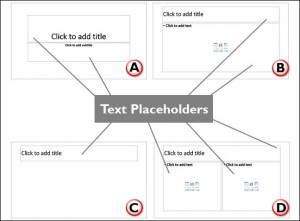
PowerPoint has three types of text containers: Text placeholders, Text boxes, and Shapes. We explain Shapes in our comprehensive
section on Shape tutorials. Let us now look at the other two text container types. Aren't Text Placeholders and Text Boxes the same?
Are they really different? And why should we bother even if they are different?
Ribbon and Tabs

The Ribbon is the long strip comprising tabs with buttons across the top of the main window within the PowerPoint 365 interface.
The Ribbon contains almost all the commands you need to work with your slides, and is designed in a way that helps you quickly
find the commands that you need to complete a task.
Import Outlines

Creating outlines for PowerPoint in various external applications lets you stay away from distractions in PowerPoint-land and
concentrate on the structure of your slides rather than their appearance. Once you have the outline created, it's very easy to
import it in the form of slides into PowerPoint. While this import process works the same way in all versions of PowerPoint,
there are small interface changes.
|
|
Learn PowerPoint 365 for Mac
Creating PowerPoint Outlines in Microsoft Word

Typically, there are three common ways in which you can create slides in PowerPoint. The first of these three ways is to create an
outline, but all these three ways can be combined with each other. Having said so, it is best to start by creating an outline for
your presentation in another program. Mac users can create outlines in TextEdit. You can also use Microsoft Word. In this tutorial,
we'll show how you can use Word 365 for Mac to create an outline for a PowerPoint presentation.
Ribbon and Tabs

The Ribbon made its debut in PowerPoint 2011 for Mac. Unlike the PowerPoint versions on Windows though, the Ribbon did not replace all the menus and toolbars that were found in PowerPoint 2008 and older Mac versions.
|
|
|
|
|
|
|
|
|
|
|
|
|
|
|