|
PowerPoint and Presenting News
|
Presentation Management Strategic to Enterprise Communication: Conversation with James Ontra

James Ontra is co-founder and CEO of Shufflrr. His 30-year career has focused on the highest profile presentations
for world class companies. His clients have included: American Express, Bloomberg, Epcot Center, Mercedes Benz, NBC Olympics, Warner
Bros. and many more. His vision and strategy have been driving Presentation Management to become a recognized communication
discipline. In this conversation, James discusses how presentation management is strategic to enterprise communication.
Read the conversation here.
|
|
Jigsaw Graphics for PowerPoint
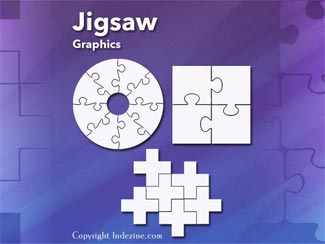
Jigsaws are puzzles that can be solved - but then jigsaws have numbers too! Each jigsaw puzzle has a number of pieces that
have to be fitted together, in the same way that many aspects of lives and businesses need to fit in with each other.

Jigsaws can add a whole new level of interest to a PowerPoint slide. Here are 10 jigsaw graphics containing different shapes.

These jigsaws can be used on their own, or also combined with other graphics such as a human head to create a larger concept!
Download and use these Jigsaw Graphics in your slides for just $4.99+
|
|
Presentation Summit-Powtoon Contest: Conversation with Rick Altman

Rick Altman has been hired by hundreds of companies, listened to by tens of thousands of professionals, and read by
millions of people, all of whom seek better results with their presentation content and delivery. He covers the whole of the industry,
from message crafting, through presentation design, slide creation, software technique, and delivery. He is the host of the
Presentation Summit, now in its 17th season as the most prominent learning event for the presentation community. In this conversation,
Rick talks about the Presentation Summit-Powtoon Contest.
Read the conversation here.
|
|
Powtoon: Conversation with Ronen Baran

Ronen Baran is Powtoon’s Head of Product & Strategy and Acting COO. After earning his MBA at UCLA, Ronen led
strategic initiatives as a management consultant, and later as a director of corporate strategy at Yahoo!, after which he was the
product marketing lead for MarketShare (acquired by Neustar). At Powtoon, Ronen leads the product team, strategic planning, and
operations. In this conversation, Ronen talks about Powtoon.
Read the conversation here.
|
|
Presentitis: Conversation with Robert Befus

Bob Befus is passionate about helping scientists and clinicians present the results of their research. In the
1980s, he co-founded a company that eventually became Research Presentation Strategies (RPS). RPS developed and manages
SlideSource.com, a presentation management tool that lets you organize and share your presentations from one secure online library
anytime, anywhere. In this conversation, Bob discusses presentitis.
Read the conversation here.
|
|
|
|
Learn PowerPoint 2016 for Windows
Edit Annotations with Ink Tools

When you use the Pen and Highlighter tools to annotate, you are provided with an option to save those annotations when you exit Slide
Show view. If you do opt to save them, then you will actually open doors to new capabilities that will allow you to edit these
annotations – in fact, you can also change these annotations to shapes and work more with them!
Add Headers and Footers to Slides

The terms Header and Footer typically come from word processing programs; these denote repeated elements that show at the top
and bottom of every page. Headers and Footers work similarly on PowerPoint slides: the Footer is a line of text that usually
appears at the bottom of a slide. Typically, the Footer area includes three placeholders: Date, Footer, and Slide number. By
default, the footer with one or more of these three placeholders appears on every slide in a presentation, but you can change
that as required.
|
|
Learn PowerPoint 2016 for Mac
Using the Pen and Highlighter Tools in Slide Show View

While presenting, annotation can play a large role in how you interact with your audience. In PowerPoint, you can use the Pen
tool that can change your static slide into a whiteboard upon which you can annotate, simply by doodling or writing! In this
tutorial, we will learn how to use Pen tool in PowerPoint 2016 for Mac.
|
|
|
|
|
|
|
|
|
|
|
|
|
|