|
PowerPoint and Presenting News
|
Clichés: Stack of Coins Pictures in PowerPoint

Let’s admit that coins can look beautiful, especially if they are golden! Add an interesting light source and a stack of gold
coins does appear warm and secure. However, what was once interesting can soon become boring; and then you may no longer like
pictures that contain neat stacks of properly arranged coins.
Are coins synonymous with wealth? Are there other, better options?
|
|
|
|
Create a Dynamic Countdown in PowerPoint

Do you have something significant coming up? Is there an important product release, a groundbreaking conference, a huge merger, the
opening of a new office, or something else that is happening? Or maybe, you just want to welcome the New Year or some other holiday in
style? What if you could create a dynamic countdown and display it in your office lobby or any other suitable location?
Kurt Dupont of PresentationPoint explains how you can create a dynamic
countdown.
|
|
Presenting Quotes
If You’ve Ever Sat Through a Typical PowerPoint Presentation: by John Medina
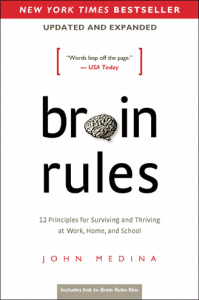
As you no doubt have noticed if you’ve ever sat through a typical PowerPoint presentation, people don’t pay attention to
boring things. You’ve got seconds to grab someone’s attention and only 10 minutes to keep it. At 9 minutes and 59 seconds,
something must be done to regain attention and restart the clock–something emotional and relevant. Also, the brain needs a break.
That’s why I use stories in this book to make many of my points.
|
|
Learn PowerPoint for Windows
Add an Em Dash

You may want to quickly add an em dash within your text container—be it a placeholder, text box, shape, or even a table. It’s
very easy to add an em dash, and there is more than one way to achieve this task, although there may be some differences, and
all ways may not work in the version of PowerPoint you are using. But certainly, using one of these options, you will be able
to add an em dash in PowerPoint.
|
|
Learn PowerPoint for Mac
Add an Em Dash

You may want to quickly add an em dash within your text container—be it a placeholder, text box, shape, or even a table. It's
very easy to add an em dash, and there is more than one way to achieve this task, although there may be some differences, and
all ways may not work in the version of PowerPoint you are using. But certainly, using one of these options, you will be able
to add an em dash in PowerPoint for Mac.
|
|
Learn PowerPoint 365 for Windows
Notes Pane

PowerPoint 365 for Windows's tri-paned interface has three regions: the Slides Pane, the Slide Area, and the Notes Pane.
The Notes Pane is placed right below the Slide Area. The Notes Pane provides space to add speaker's notes that can be so
helpful to the presenter while presenting. You can also add any text here that contains any sort of information about the
presentation or individual slide.
|
|
Learn PowerPoint 365 for Mac
Notes Pane

PowerPoint 365 for Mac's tri-paned interface has three regions: the Slides Pane, the Slide Area, and the Notes Pane. The
Notes Pane is placed right below the Slide Area. The Notes Pane provides space to add speaker's notes that can be so helpful
to the presenter while presenting. You can also write any sort of information about the presentation or individual slide.
|
|
|
|
|
|
|
|
|
|
|
|
|
|