by Geetesh Bajaj, July 05, 2016
View this as a web page
This email is being sent to you because you subscribed to the PowerPoint and Presenting newsletter from Indezine.com
Here is your subscription information:
Name: {!name}
Email: {!email}
Subscribed on: {!signdate long}
To ensure future delivery of emails, please add mailinglist @ indezine.com
to your address book.
|
Presentitis: Conversation with Robert Befus
 Bob Befus
 is passionate about helping scientists and clinicians present the results of their research. In the 1980s, he
co-founded a company that eventually became Research Presentation Strategies (RPS). RPS developed and manages SlideSource.com, a presentation
management tool that lets you organize and share your presentations from one secure online library anytime, anywhere. In this conversation,
Bob discusses Presentitis.
Read the conversation here
|
Dynamic LIKES: Conversation with Kurt Dupont
 Kurt Dupont
, based out of Belgium heads PresentationPoint, a company that creates several amazing PowerPoint add-ins. After
his Computer Science studies, Kurt started with Andersen Consulting (Accenture nowadays) in Brussels. After three years he moved to the
Brussels Airport Terminal Company that runs the Brussels airport - this last placement inspired the start-up of Take-off (now known as
PresentationPoint) in 1998. In this conversation, Kurt discusses Dynamic LIKES, an add-in that lets you promote your Facebook page on your
PowerPoint slides, continuously updated.
Read the conversation here
|
emaze Android App: Conversation with Motti Nisani
 Motti Nisani
 is the CEO of emaze, a company that produces a tool of the same name. With emaze, you can create presentations
in virtual 3D worlds or simply in slides like. Motti has a B.Sc. degree in Engineering from Tel-Aviv University, Israel. In this interview,
Motti discusses the new Android app for emaze.
Read the conversation here
|
The Single Most Important Factor For Persuasion
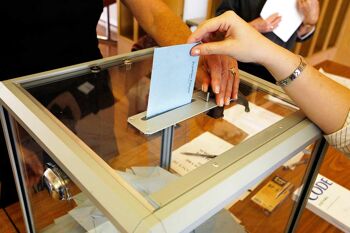
An indisputable fact of life in every company, every industry, every vertical, every geography, is that salespeople sell features when
they should be selling benefits instead. This mistake is also chronic in presentations because presenters too often focus on their own
message to the exclusion of their audiences, causing them to think: "Why should I care?" or "It's all about you!" Politicians fall into
the same trap. A recent scientific study about persuasion in the political arena found that each side of the political spectrum tends to
appeal only to the principles of their base and not to those of the opposition. Doing so not only fails to move any voters beyond those
who are already committed, it also drives the wide wedge in our polarized country ever deeper. The latter problem is the equivalent of a
presenter from a startup company pitching for financing only from an existing investor, or a sales person selling only to existing
customers. The sales person thus gives up the possibility of gaining a new client or, better still, capturing a competitor's customers.
Read more here
|
Learn PowerPoint 2016 for Windows
 Align Shapes

When you believe in the freedom of creativity, you may not want to restraint objects on a slide to be aligned geometrically. Indeed, you
may want everything placed in an organic, non-aligned manner. Ultimately, the decision to align is influenced by the scenario -- sometimes
it works, and some other times, an unaligned bunch of shapes looks perfectly natural and organic.
Manipulating Shapes by Dragging Yellow Handles

There are so many different types of shapes that PowerPoint provides you with, and you can format these shapes by resizing, rotating,
flipping, etc. Other than these basic formatting tasks, you must explore the special yellow round handles. Most shapes in PowerPoint
2016 when selected, display eight resizing handles and a single rotation handle. In addition, some shapes also have one or more yellow
round handles -- these yellow round handles enable you to change some facets of the selected shape, or in some cases you can change the
entire shape.
Smart Lookup
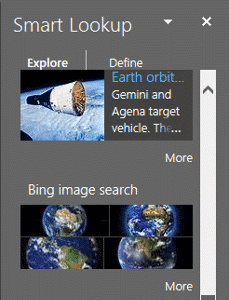
The new Smart Lookup feature in PowerPoint 2016 is an option that brings up definitions, images, and other results from various online
resources about a word or phrase, right within PowerPoint. PowerPoint's online documentation sometimes calls this feature Insights, and it
looks like the terms Insights and Smart Lookup are the same features.
Duplicate Shapes by Dragging

Shapes in PowerPoint 2016 are very useful in representing design or content, or in showing a process or a sequence. However, when you
create a slide that has many such shapes, you'll find that most of your shapes may be the same size and may also share other similar
attributes. Yes, you can go ahead and insert the same shape into PowerPoint repeatedly, but that will consume much of your productive time
that you could have used elsewhere! There are quicker alternatives for duplicating shapes that can be learned if you follow these
guidelines.
Select and Deselect Shapes

PowerPoint 2016 expects you first to make a selection, and then the do something such as clicking a button to perform an action for the
selected slide objects. If you cannot select an object, then you cannot modify it at all. Although this tutorial explains how you can
select shapes on a slide, the process works the same way for any other slide object.
|
PowerPoint Templates on Indezine
|
PowerPoint Templates on MedicinePPT
|
PowerPoint Templates on LegalPPT
|
PowerPoint Templates on FreePPTTemplates
|
PowerPoint Templates on ChristianPPT
|
|
|
|
|
|
|
|
|
End Note
Received this email from a friend? If you would like to join our mailing list,
go here.
Read past issues of this newsletter
This newsletter provides more info on better PowerPoint usage and presentation design. You can also opt to get
our RSS feed, where you can get updates
through Feedburner.
See our Privacy Policy.
Follow on Twitter |
Join our LinkedIn Group
| Join our Facebook Group
Do let us know how we are doing -- we love to hear from
you! And if you enjoyed reading any content on Indezine.com, please do like them on Facebook and other
social platforms, click the Google +1 buttons on all these pages, and tweet them all so that you can share
these joys with others -- and keep your feedback coming! Have a fabulous week.
Our PowerPoint and Presenting Blog is updated
daily with information
on what's new and happening in the world of PowerPoint.
The Indezine News mailing list is powered by
Aweber.
If for any reason, you no longer want to receive this newsletter with valuable tips, resources,
and information about PowerPoint and presenting stuff, you can unsubscribe by clicking the link at
the end of this email. No hard feelings!
{!global calltoaction}
|
|